
 1.866.458.6999
Key Takeaways
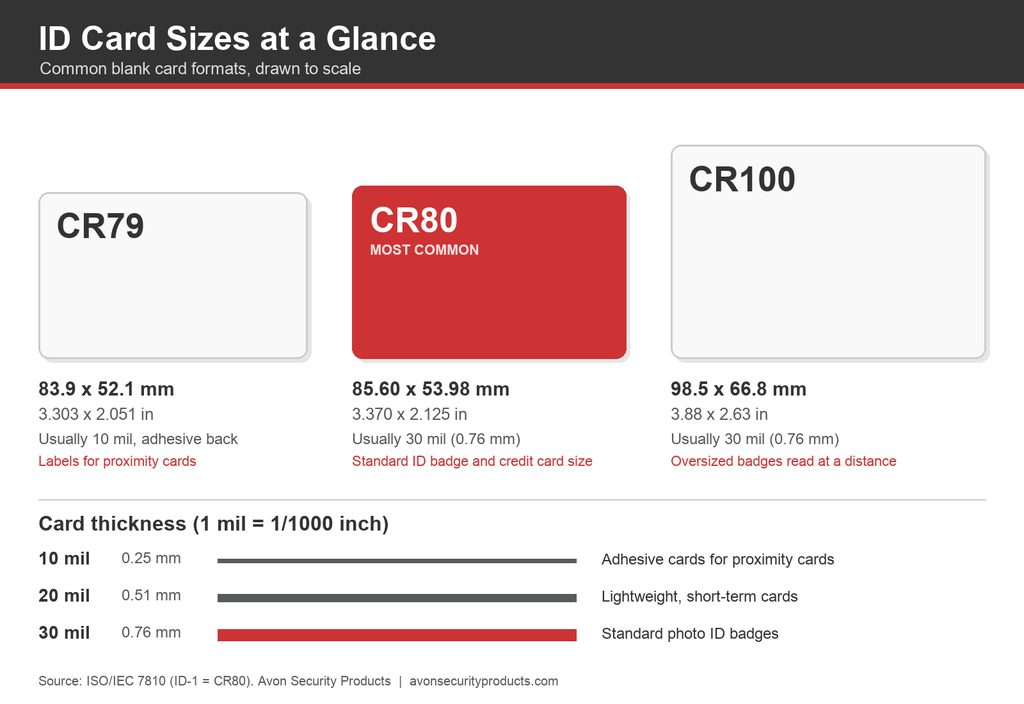
- The standard ID card size is CR80, which measures 85.60 x 53.98 mm (3.370 x 2.125 inches), the same size as a credit card.
- CR79 cards are slightly smaller and much thinner, and they are made to stick onto proximity cards that are too thick to print on.
- CR100 cards measure about 98.5 x 66.8 mm (3.88 x 2.63 inches) and need a printer built for oversized cards.
- Card thickness is measured in mil, where one mil is a thousandth of an inch, and 30 mil (0.76 mm) is the standard for photo ID badges.
- Our technical support teams frequently diagnose badge warping and premature cracking in fast-paced corporate environments. Standard 100 percent PVC cards deliver exceptional performance for basic employee and visitor badges printed on direct-to-card systems. However, when an organization upgrades to advanced laminating units or high security retransfer printers, the intense thermal process can buckle standard plastic. Moving to a composite blend, consisting of 60 percent PVC and 40 percent polyester, provides the structural heat resistance necessary to protect your equipment investment and maximize card lifespan.
The standard ID card size is CR80, a card that measures 85.60 x 53.98 millimetres (3.370 x 2.125 inches, often rounded to 3.375 x 2.125) and is usually 30 mil (0.76 mm) thick. It’s the same size as the credit card in your wallet, and it’s the size that almost every ID card printer, badge holder, and card reader is designed around.
Selecting the appropriate card dimensions and material constraints is a critical first step when establishing a reliable enterprise credential program. For corporate operations, healthcare facilities, and government institutions across Canada, standardizing card stock is not simply an administrative task. It directly impacts hardware printhead longevity, access control scanning accuracy, and long term operational overhead. While standard deployments center around a uniform layout, integrating proximity cards, visitor management tracking, or specialized event passes requires a distinct understanding of hardware compatibility.
What Is the Standard ID Card Size?
The standard size for employee badges, student cards, and most company IDs is CR80. The international standard for identification cards, ISO/IEC 7810, calls this format ID-1 and defines it as 85.60 x 53.98 mm with rounded corners and a thickness of 0.76 mm. The card industry calls the same card CR80, and you’ll see both names on product listings.
So if someone asks what size a company ID card, a college ID card, or a driver’s licence is, the answer is almost always CR80. Your badge holders, lanyard clips, card readers, and printer trays all expect a card of exactly this size. Only switch to another size when your printer or access system calls for it.
CR80 vs CR79 vs CR100: How Do the Sizes Compare?
Three card sizes cover nearly every ID program, plus one large-format pass for events. Here is how they compare side by side.
| Card size | Millimetres | Inches | Typical thickness | What it’s used for |
|---|---|---|---|---|
| CR80 | 85.60 x 53.98 | 3.370 x 2.125 | 30 mil (0.76 mm) | CR80 is the standard card for employee badges, student IDs, membership cards and access cards. |
| CR79 | 83.9 x 52.1 | 3.303 x 2.051 | 10 mil (0.25 mm) with an adhesive back | CR79 is printed and then stuck onto the face of a proximity card or clamshell card. |
| CR100 | 98.5 x 66.8 | 3.88 x 2.63 | 30 mil (0.76 mm) | CR100 is an oversized badge used where a card needs to be read from further away. |
| Large-format pass | 88 x 140 | about 3.5 x 5.5 | 24 mil (0.61 mm) | Large-format passes are used for events and visitor badges that staff check at a distance. |
CR80: The Card Most Organizations Need
CR80 represents the foundational baseline for professional identification programs. Because it represents the structural default, deploying standard CR80 blanks optimizes data formatting within your centralized ID card software. When card data fields, high resolution photos, and corporate branding layouts are mapped to a standard space, issuance workflows remain fast and efficient. This uniform sizing prevents layout distortion during batch printing and ensures that security personnel can instantly verify credentials at structural checkpoints.
Blank CR80 cards come in plain white PVC, with magnetic stripes, with smart chips, and as key tag cards that snap into a full-size card plus smaller tags for a key ring. Because CR80 is the default, it also gives you the widest choice of holders, lanyards, and printer supplies.
CR79: The Adhesive Card for Proximity Cards
A proximity card is an access card with a small antenna inside that unlocks a door when you hold it near a reader. The thicker styles, often called clamshell cards, won’t fit through a desktop ID card printer, so organizations print a thin CR79 adhesive card instead and stick it onto the front. The slightly smaller CR79 size leaves a margin around the edge, which keeps the label from lifting at the corners.
Attempting to feed thick, rigid clamshell cards through a standard desktop printer introduces severe risks of mechanical misalignment, cracked printheads, and torn printer ribbons. Utilizing specialized CR79 adhesive back cards completely circumvents this hazard. However, printing on adhesive substrates demands high grade ID card printer ribbons and supplies formulated to handle complex thermal transfer conditions. Furthermore, because adhesive residue can gradually accumulate on tracking rollers, organizations adopting this framework should execute mandatory cleaning cycles to safeguard print consistency and ensure system continuity.
We carry CR79 and CR80 adhesive PVC cards at 10 mil in both paper-backed and Mylar-backed versions. If your staff already carry proximity access cards, this is the simplest way to add a photo and name without replacing them.
CR100 and Large-Format Passes
CR100 cards are larger than a standard badge, which makes the photo and name easier to read across a room or a checkpoint. Large-format passes go further still. The Zebra ZC10L we sell prints passes of about 3.5 x 5.5 inches (88 x 140 mm) for concerts, conferences and sporting events. Both sizes need a printer built for oversized cards, so a standard badge printer won’t handle them.
How Thick Is an ID Card?
ID card thickness is measured in mil, and one mil equals one thousandth of an inch. It has nothing to do with millimetres, although the two are easy to mix up. A 30 mil card is 0.030 inches thick, or about 0.76 mm.
- 10 mil (0.25 mm) cards are thin, flexible and usually have an adhesive back, which makes them the right choice for labels on proximity cards.
- 20 mil (0.51 mm) cards are lighter and cheaper, and they suit short-term uses such as event passes, temporary cards and loyalty cards.
- 30 mil (0.76 mm) cards are the standard thickness for photo IDs, and magnetic stripe and chip readers are designed around them.
For a staff badge that people carry every day, choose 30 mil. The price difference is small, and a thicker card bends less in a back pocket and feels like a proper credential in the hand.
What Are ID Cards Made Of?
Most ID cards are made of PVC (polyvinyl chloride), a tough, flexible plastic that takes printed photos and colour graphics well. Two other materials are worth knowing about when your cards face heavy daily use or need to last for many years. Our guide to what PVC cards are covers the first material in more detail.
| Material | What it is | When to choose it |
|---|---|---|
| PVC | PVC is a flexible plastic that is affordable, prints sharp colour and works in almost every ID card printer. | Choose PVC for most employee, student and membership badges. |
| Composite (60/40) | A composite card blends about 60% PVC with 40% polyester, which helps the card resist heat and bending. | Choose composite when you laminate cards or print with a retransfer printer, because both processes heat the card. |
| Polycarbonate | Polycarbonate is a rigid, highly durable plastic that can be laser engraved so the details can’t be scraped off. | Choose polycarbonate for long-life, high-security credentials, and confirm your printer supports it first. |
Polycarbonate is the same material Canada now uses for the personal information page of the passport. According to the Government of Canada, the polycarbonate page lasts longer, resists water damage, and carries laser-engraved details that are harder to tamper with.
If you’re wondering which card lasts longest, composite outlasts standard PVC in daily use because its polyester content resists heat and bending, and polycarbonate lasts longer still. When employee badges keep cracking after a few months, moving from PVC to composite is usually the simplest fix.
We stock CR80 30 mil cards in all three materials, including our recyclable EcoCard Pro PVC line for organizations that want a greener option.
Which ID Card Printers Take Which Sizes?
Most desktop ID card printers are built for CR80 cards, and many accept a range of thicknesses beyond the standard 30 mil. Before you order anything other than a standard CR80 PVC card, check these four points against your printer’s specifications.
- Confirm the card sizes your printer supports, because some models need a setting change or a different card guide to feed CR79 cards.
- Look up the minimum and maximum card thickness in mil, since a card outside that range can jam or print poorly.
- Make sure the printer suits the card material, as polycarbonate usually calls for a retransfer printer or laser engraving.
- If you use magnetic stripe or chip cards, choose a printer with a built-in encoder, because a standard printer prints the card face but can’t write the data.
As an example, the Zebra ZC300 we sell takes both CR80 and CR79 cards. Its feeder adjusts to the thickness of each card automatically, so you can switch between card stocks without changing settings. CR100 cards and large-format passes are the exception to all of this, since they need a dedicated oversized card printer.
How Do You Choose the Right Card Size for Your ID Program?
The card has to work with everything around it, so work through your system in this order before you place an order.
- Start with your door readers, because an access control system that uses proximity cards will steer you toward CR79 adhesive cards.
- Confirm your printer’s supported sizes, thicknesses, and materials so the cards feed and print cleanly.
- Match your badge holders and lanyard clips, which are almost always made for CR80.
- Think about how long each card has to last, and step up to composite or polycarbonate for cards that should survive several years.
- Order a small pack to test before committing to a full year’s supply.
Secure Your System Infrastructure with Professional Credential Guidance
Building a sustainable, scalable identification program requires careful alignment between printer engineering, software capabilities, physical reader frequencies, and underlying card composition. Choosing an incorrect card dimension or a mismatched thickness introduces immediate risks of system jams, rapid ribbon breakage, and facility access failures. Instead of diagnosing complex technical variables in isolation, protect your operational continuity by partnering with an established leader. Contact the expert technical advisory team at Avon Security Products today at 1-866-458-6999 to receive a personalized system evaluation and component recommendation backed by comprehensive Canadian inventory and long-term deployment support.
Frequently Asked Questions
What size is a company ID card?
A company ID card is almost always CR80, which measures 85.60 x 53.98 mm (3.370 x 2.125 inches) and is 30 mil (0.76 mm) thick. That’s the same size as a credit card, and it’s the size that badge holders, lanyard clips, card readers, and desktop ID card printers are designed for. Some organizations add a thinner CR79 adhesive card to a proximity card, and events sometimes use larger CR100 badges. For everyday employee badges, Avon Security Products stocks CR80 30 mil cards in PVC, composite, and polycarbonate.
Is an ID card the same size as a credit card?
Yes, a standard ID card and a credit card share the same CR80 size, which the ISO/IEC 7810 standard calls ID-1. Both measure 85.60 x 53.98 mm (3.370 x 2.125 inches) with rounded corners, and both are about 0.76 mm (30 mil) thick. Because the size is identical, an employee badge fits the same wallets, card sleeves, and badge holders as a credit card, and standard desktop ID card printers are built around it.
What does 30 mil mean on an ID card?
Mil is a unit of thickness equal to one thousandth of an inch, so a 30 mil card is 0.030 inches, or about 0.76 mm, thick. Mil has nothing to do with millimetres, even though the two words sound alike. Thirty mil is the standard thickness for photo ID badges and credit cards, 20 mil suits lighter short-term cards, and 10 mil is used for adhesive cards that stick onto proximity cards. The standard blank CR80 cards Avon Security Products stocks are 30 mil.
What is the difference between CR79 and CR80 cards?
A CR79 card measures 83.9 x 52.1 mm (3.303 x 2.051 inches), slightly smaller than a CR80 card. CR79 cards are usually 10 mil thick with an adhesive back, and you print them first, then stick them onto a proximity card that’s too thick for a printer. Avon Security Products carries CR79 adhesive cards in paper-backed and Mylar-backed versions. Choose CR79 when you’re adding a printed face to an existing access card, and choose CR80 for a standard full-size badge.
Can you print directly on a proximity card?
Thin, flat proximity cards made to the standard ISO card size, such as the HID ISOProx II, can be printed in most desktop ID card printers. The thicker clamshell style can’t feed through a standard printer, so organizations print a CR79 or CR80 adhesive card and apply it to the front instead. Avon Security Products stocks printable proximity cards and adhesive cards, and our team can check your card type and printer model before you order.