
 1.866.458.6999
Key Takeaways
- A proximity card is a type of RFID card that works at 125 kHz and sends the same fixed ID number to the reader every time.
- The cards people call RFID or smart cards such as HID iCLASS SE, Seos, and MIFARE DESFire work at 13.56 MHz and use keys to protect their data.
- A 125 kHz reader can’t read a 13.56 MHz card, so the readers on your doors decide what you can issue today.
- Prox suits sites that need replacement cards for working 125 kHz readers; 13.56 MHz suits sites where a risk assessment calls for credentials that resist copying, or where readers are being replaced anyway.
- Multi-technology readers and dual-technology cards let an existing prox site change over in stages instead of all at once.
The difference between RFID and proximity cards is that a proximity card is one specific kind of RFID card: it runs at a low frequency of 125 kHz and sends a fixed ID number to any reader that powers it. Secure 13.56 MHz access cards such as iCLASS SE, Seos™ and MIFARE DESFire carry a chip that can authenticate the reader with secret keys, and when the system uses their secure application, they are designed to resist copying.
Neither one is right for every building. If your organization already runs prox, the practical questions are what your readers support, how much risk a copied badge would create at your site, and whether changing over in stages makes sense.
Understanding the Basics: RFID Cards and Proximity Cards
RFID stands for radio frequency identification. It describes any card, tag or fob that exchanges data with a reader through a radio field without touching it. Proximity cards and smart cards both belong to this family, which is why you’ll see “RFID proximity cards” and “proximity RFID readers” used side by side. They’re two halves of one system: the card you carry and the reader on the wall.
The main difference is the operating frequency, measured in kHz (thousands of cycles per second) or MHz (millions). A card and a reader must share a frequency and a supported technology to communicate. A reader built only for 125 kHz will not respond to a 13.56 MHz card at all.
What Is a Proximity Card?
A proximity card, often shortened to prox card, is a 125 kHz RFID card used for door access. HID’s ProxCard II datasheet describes it as a passive card, which means there’s no battery. Inside the plastic is a copper antenna coil and a small chip, and the reader’s radio field powers the chip long enough for it to reply with its stored number.
That number has two parts. The facility code identifies your organization or site, and the card number identifies one person’s card. In the common 26-bit format, which HID calls H10301, 8 bits hold the facility code and 16 bits hold the card number, plus a check bit at each end that helps the reader catch a bad read. That allows 256 facility codes with 65,536 card numbers under each one, so two unrelated organizations can hold cards with the same card number. The facility code is what keeps them apart. The reader passes both to the door controller, for example over a Wiegand interface, and the controller checks them against its cardholder list. On HID proximity cards, the format, facility code, and number are encoded before the cards are issued, so replacements have to match what your system already expects. Some organizations use a longer format instead, such as HID’s Corporate 1000, where HID assigns the organization its own company ID and tracks the card numbers issued under it so they aren’t repeated for another customer. If your cards are in a format like that, reorders go through the same company ID.
Not every 125 kHz reader reads every 125 kHz card. HID Prox, Indala, and AWID are separate prox technologies, so the reader has to support the one your cards use.
What Is an RFID Smart Card Credential?
When people compare RFID cards with proximity cards, they usually mean a high-frequency smart card that works at 13.56 MHz. The names you’ll usually see on access control specs and purchase orders are HID iCLASS SE, HID Seos™, and MIFARE DESFire, which is made by the chip company NXP. NXP’s MIFARE DESFire EV3 datasheet lists it as an ISO/IEC 14443 contactless card with memory options measured in kilobytes and room for several separate applications.
The security difference comes from authentication. HID’s Seos™ card datasheet and the DESFire EV3 datasheet both describe AES-based mutual authentication, where card and reader prove they hold matching keys before protected data is released. What a card reveals before authentication varies by credential and privacy settings. Some cards return a fixed serial number, called the UID, while NXP’s datasheet lists a Random ID option for DESFire EV3 that returns a different identifier each time. Either way, a secure deployment reads the protected credential rather than relying on that public identifier.
RFID vs. Proximity Cards: What Sets the Two Technologies Apart?
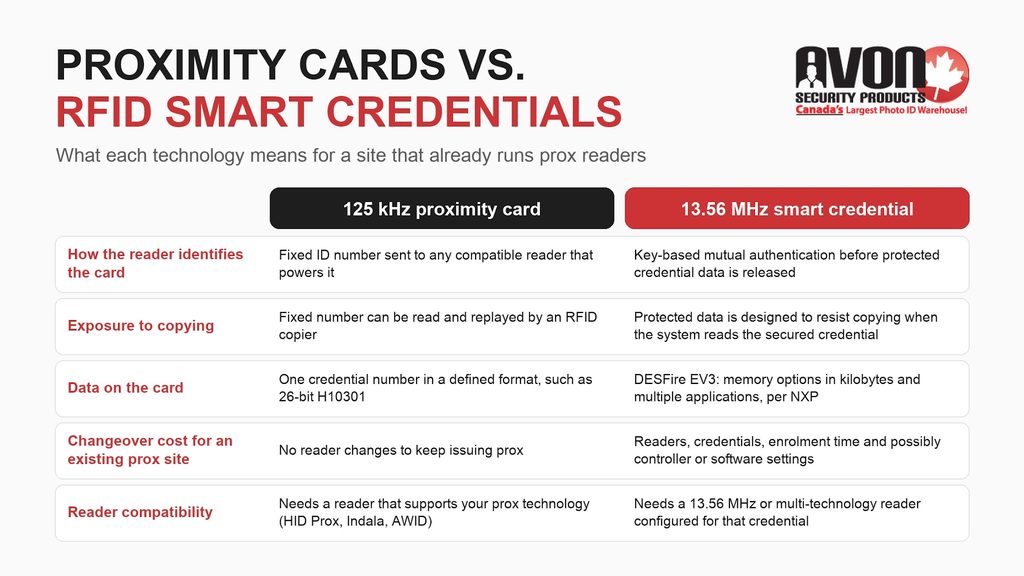
The table compares standard 125 kHz proximity cards with current 13.56 MHz smart credentials on the points that affect an administrator’s decision.
| What it means for your site | 125 kHz proximity card | 13.56 MHz smart credential (iCLASS SE, Seos, DESFire EV3) |
|---|---|---|
| How the reader identifies the card | Fixed ID number sent to any compatible reader that powers it | Key-based mutual authentication before protected credential data is released; public identifier behaviour varies by credential and privacy settings |
| Read range at the door | Set by the reader model and mounting; check the reader datasheet | Set by the reader model and mounting; check the reader datasheet |
| Exposure to copying | Fixed number can be read and replayed by an RFID copier | Protected data is designed to resist copying when the system reads the secured credential |
| Data on the card | One credential number in a defined format, such as 26-bit H10301 | DESFire EV3: memory options in kilobytes and multiple applications, per NXP; check the datasheet for other families |
| Changeover cost for an existing prox site | No reader changes to keep issuing prox | Readers, credentials, enrolment time and possibly controller or software settings |
| Reader compatibility | Needs a reader that supports your prox technology (HID Prox, Indala, AWID) | Needs a 13.56 MHz or multi-technology reader configured for that credential |
Range and Speed
For door access, read range depends mostly on the reader model, its mounting surface and the card, not on whether the card is prox or a smart card. Manufacturers publish read ranges for specific reader and card combinations, so check the reader datasheet rather than the card type alone. Mounting matters too: a reader fixed directly to a metal door frame usually reads at a shorter distance than the same reader on drywall, which is why some readers are sold in metal-mount versions or with spacers. Response time at the door also depends on the reader, controller and system configuration, so range and speed shouldn’t decide the choice on their own.
Security Levels
Security is the main practical difference. A prox card sends its number to any compatible reader that powers it, with no check on who is asking. The RCMP’s communique on RFID copiers and duplicators warns that pocket-sized copiers can copy RFID credentials in seconds, and that card readers can’t tell a copied credential from the original. So yes, a standard prox card or key fob can be copied, and the copy works at every door the original opens.
A fixed prox number has nothing to stop that replay. Current smart credentials make copying harder because the protected credential only releases after key-based authentication. Not every 13.56 MHz card is equal, though. MIFARE Classic and the original iCLASS (often called iCLASS legacy or iCLASS Standard) use earlier security designs that published research has since shown can be defeated. Both makers offer newer families with stronger security: NXP’s MIFARE DESFire and HID’s iCLASS SE and Seos™. Because the names overlap, a card marked “iCLASS” isn’t necessarily the current generation, so ask your access control provider which generation and which keys your system uses before treating it as equal to Seos™ or DESFire EV2 or EV3.
The same RCMP communique lists steps that work with any card technology. For the building: keep your threat and risk assessment current, require a card plus a PIN at restricted areas, mount readers where someone can see them, and deactivate any card that’s lost or might have been copied, then issue a replacement. For the people carrying the cards: keep badges out of sight in public, including on transit and in restaurants, don’t leave them in a vehicle, and consider RFID-blocking holders. If you’re keeping prox for now, these steps lower the risk while you plan or budget an upgrade.
Compatibility and Cost
For an existing prox site, staying with prox avoids replacing and reinstalling readers at every door. Moving to 13.56 MHz means budgeting for new or multi-technology readers where the existing readers can’t support the selected credential, new credentials, staff time to enrol cardholders, and possibly controller or software updates to accept the new format. Per-card pricing varies by technology and format, so compare the total changeover cost, not the card price alone.
Types of Proximity Cards and RFID Cards
- Clamshell cards, such as the HID 1326 ProxCard II, are thick and rigid, and a photo ID is added with an adhesive label on the front.
- Thin printable cards, such as the HID 1386 ISOProx II, go through a desktop ID card printer so the access credential and photo badge are one card.
- Key fobs and tags, such as the HID 1346 ProxKey III and HID Seos™ key fobs, attach to a key ring for staff who don’t need a photo badge, such as for parking or after-hours access.
- Smart credentials such as iCLASS SE, Seos™, and MIFARE DESFire EV3 are offered in more than one form factor, and the available forms vary by credential family.
- Dual-technology cards carry a 125 kHz prox chip and a 13.56 MHz chip in one card. Check which 13.56 MHz technology is inside: a card that pairs prox with Seos™ is a different upgrade from one that pairs prox with the original iCLASS.
Matching a replacement starts with the technology and format your readers are set for, not the card style. Avon’s proximity cards range is organized by access control brand, which helps an administrator find cards listed for listed for the system already on the wall.
The Pros and Cons of Proximity Cards
- Prox cards work with the 125 kHz readers already installed at a site, as long as each reader supports that card technology and the system accepts its format, so an organization can keep issuing replacements without changing hardware.
- Their main drawbacks are the lack of card-to-reader authentication and the limited data, since the card carries one fixed number and nothing else.
- Like any electronic access system, prox readers and locks need power. How each door behaves during an outage should follow the site’s approved security and life-safety design.
Applications of Each Card
Proximity cards fit sites with working 125 kHz readers where the organization’s risk assessment accepts a fixed-ID credential, sometimes with added measures such as a PIN at restricted doors. They also fit buildings where the readers belong to a landlord or a shared system the organization can’t change.
13.56 MHz smart credentials fit new installations, reader replacements, and areas that need cards designed to resist copying. Organizations such as universities and hospitals can also use the extra memory to put separate applications on one card, provided every system involved supports that credential.
Should You Upgrade From 125 kHz Prox to iCLASS or MIFARE DESFire?
It depends on what you’re protecting, what your readers and controllers support, and your budget timeline. An existing prox site doesn’t have to change everything at once.
What to check first
- Identify the prox technology and format in use (HID Prox, Indala or AWID; for example, 26-bit H10301 or a longer format) and every facility code your system accepts.
- List the reader models at each door and check each datasheet for the credential technologies it supports.
- Confirm with your access control provider that the controller and software accept the new credential and format.
- Count cardholders and doors, then decide which areas move first based on your risk assessment.
How a phased changeover works
- Check whether your installed readers already support both technologies, and install multi-technology readers only where they don’t, so old and new cards work side by side.
- Issue dual-technology cards to people who need both old and new doors during the changeover. Choose one whose 13.56 MHz side matches the credential you’re moving to, such as Seos™ plus prox, rather than prox paired with an older technology you’ll want to retire later.
- Before choosing iCLASS SE, Seos,™ or MIFARE DESFire EV3, verify the exact reader model, which credential technologies are enabled on it, and the keys and application your system will use.
- Retire prox credentials once every door reads the new credential through its secured application with the intended keys, and 125 kHz reading and any other insecure fallback modes are disabled.
Each new credential has to be enrolled before it opens a door. Administrators program proximity cards and smart credentials the same basic way: record each card number against a cardholder, then assign access levels. Keeping old and new card numbers on the same cardholder record keeps a phased changeover organized.
How Can You Tell Which Card Technology Your System Uses?
To find out what format your HID prox cards use, check the card format settings in your access control software first. That’s the most reliable record. Then confirm it against your purchase records and the card itself.
- The card: look for a manufacturer name, a technology mark such as iCLASS orSeos™, and any printed or embossed number. On some cards, that number is only the card number, so don’t assume it reveals the facility code.
- The purchase records: HID’s Readers and Credentials How to Order Guide shows that a credential is ordered by its base part number and configuration suffix, with the programming details (format, facility code, and number range) specified separately. The original invoice or order confirmation may contain those details; if it doesn’t, ask your supplier or installer for the programming records.
- The reader and access system: the model number on the reader label or installation records tells you which technologies it reads; the access control software’s card format settings show the formats and facility codes in use. If the software shows a 26-bit format and facility codes between 0 and 255, you’re most likely on the open H10301 format.
Making the Right Choice
Stay with proximity cards when your 125 kHz readers work, your risk assessment accepts a fixed-ID credential, and you need replacements that match the cards already enrolled. Choose 13.56 MHz smart credentials when you’re replacing readers anyway, fitting out a new site, or protecting areas where a copied badge would be a serious problem. Use multi-technology readers and dual-technology cards when you need to move between the two in stages.
Need Help Choosing Proximity or Smart Cards?
Cards your readers can’t read, or a format your controller won’t accept, cost you time at every door. When you reorder, the card technology, the format, every facility code in use and the next unused card number all have to match what your system expects, and a changeover adds reader models and controller settings to that list. Avon’s specialists can help confirm those details against the system you already have and talk through your options if you’re planning an upgrade. Replacement cards come from Canadian inventory in Concord, Ontario, without unexpected duties or brokerage. To confirm compatibility, contact Avon or call 1-866-458-6999 with your reader model and any card records you have.
Frequently Asked Questions
What is the difference between RFID and proximity cards?
A proximity card is a type of RFID card that runs at 125 kHz and sends the same fixed ID number every time it’s read. The credentials usually called RFID or smart cards, such as iCLASS SE, Seos™, and MIFARE DESFire, run at 13.56 MHz and use key-based authentication to protect their data. Current smart credentials are designed to resist copying and can hold more data, while prox cards work with the 125 kHz readers a site may already have installed.
Can we keep ordering prox cards for our existing readers?
Yes, as long as the new cards match the technology, format, and facility code your readers and access system already use. Prox remains a reasonable choice for sites whose risk assessment accepts a fixed-ID credential. Before reordering, confirm the prox technology (HID Prox, Indala, or AWID), the card format, every facility code in use, and the next unused card number. A mismatch on any of these can produce cards that don’t open the door, even when the reader appears to respond.
What is the difference between a MIFARE card and a proximity card?
A MIFARE card is a 13.56 MHz smart card built on an NXP chip, while a standard proximity card is a 125 kHz card. A single-frequency reader can’t read both, so your reader decides which one you can use. MIFARE DESFire EV2 and EV3 use AES-based authentication, while the older MIFARE Classic family uses a different security design. A prox card has no authentication at all, so confirm which MIFARE family and settings your system uses.
Will my 125 kHz reader work with iCLASS or DESFire cards?
No, a reader that only supports 125 kHz can’t read a 13.56 MHz card such as iCLASS SE, Seos™, or MIFARE DESFire. To use those credentials, you’ll need a reader that supports the specific smart card technology, and multi-technology readers can read both frequencies. During a changeover, dual-technology cards carry a prox chip and a smart chip, so one card opens doors with old and new readers until every door has been converted.
Should we upgrade from 125 kHz prox to iCLASS or MIFARE DESFire?
Upgrade when a risk assessment calls for credentials that resist copying, or when readers are due for replacement anyway. If your prox readers work and the risk is accepted, keeping prox with measures such as a PIN at restricted doors is a reasonable choice. Before choosing iCLASS SE, Seos™, or DESFire EV3, verify the reader model, enabled credential technologies, keys, and application. Multi-technology readers and dual-technology cards let you change over in stages.
Do proximity cards need a battery?
No, standard proximity cards and smart cards don’t contain a battery. The reader sends out a radio field, and the card’s antenna collects enough energy from that field to power its chip and reply. That’s why the cards are thin and never need charging. The exception is active long-range tags, which carry a battery so they can be read from a distance, such as at a parking gate or a vehicle entrance to a site.