
 1.866.458.6999
Key Takeaways
- An HID proximity card is a battery-free 125 kHz card that sends a fixed number to the door reader.
- New cards only work when their technology, format, and facility code match what your system accepts.
- HID, Indala, and AWID prox cards all run at 125 kHz, but a reader only reads the technologies it’s set up for.
- For photo badges, use a printable prox card, because clamshell cards won’t go through an ID card printer.
- Prox cards can be copied, so sites that need more security can move to Seos™ or MIFARE DESFire in stages.
An HID proximity card is a 125 kHz access card with a small antenna inside that sends a stored number to a door reader when you hold it a few centimetres away. The reader passes that number to your access control system, which decides whether to unlock the door. HID Global makes the ProxCard II, ISOProx II, DuoProx II and ProxKey III, and many organizations say “HID card” when they mean any prox card from these families.
If you already run a prox card system and need to replace, add or reissue cards, three things decide whether new cards will work: how the card talks to the reader, which 125 kHz technology your readers accept (HID, Indala or AWID), and the format and facility code your controller expects.
How Does an HID Card Work?
An HID card works by borrowing power from the reader, the small unit beside the door, which gives off a weak radio field at 125 kHz. That figure means the signal repeats 125,000 times a second. 125 kHz sits in the low-frequency (LF) radio band, which runs from 30 to 300 kHz, so spec sheets call these low-frequency prox cards.
Inside the card sits an antenna, a coil of fine copper wire around the edge, connected to a tiny chip. When the card enters the reader’s field, the coil picks up enough energy to wake the chip, which then sends back its stored number.
Because the card takes all its power from the reader, it’s called a passive card, and it never needs a battery. It’s also an RFID card. RFID (radio frequency identification) is the technology, and HID Global is a manufacturer, so “HID vs RFID” is really a comparison between HID’s 125 kHz prox cards and 13.56 MHz smart cards, which the limits section below covers.
What Happens When You Wave Your Card at the Reader?
- The cardholder presents the card near the reader, and the reader’s radio field powers the card’s antenna and chip.
- The card sends its number back to the reader, and the number is the same every time because a classic prox card can’t change or hide it.
- The reader passes the number to a door controller. In installations using Wiegand, the number travels as a string of bits that carries the card number and, in formats such as the 26-bit H10301, a facility code.
- The controller checks the number against its list of approved cards and unlocks the door if that card is allowed in at that time.
The card holds no names or permissions. Everything that decides who gets in, and when, lives in your access control software, which is why a lost card can be switched off without touching the reader.
What Are the Different Types of HID Cards and Prox Fobs?
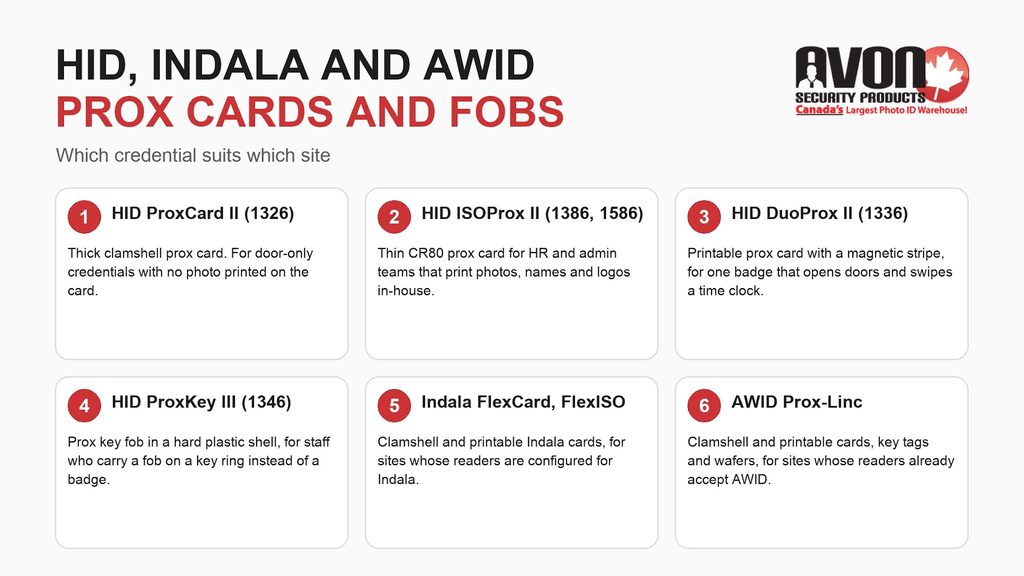
HID offers its 125 kHz prox technology in several card and fob forms, and Indala and AWID make credentials on the same frequency that need readers set up for their own technology. The right choice depends on what your readers accept today and how your staff carry and display their credentials.
| Card or fob | What it is | Who it suits |
|---|---|---|
| HID ProxCard II (1326) | A thick clamshell prox card. HID’s ProxCard II datasheet sets out its specifications and its compatibility with HID proximity readers. | Sites that need a door credential only and don’t print photos directly on the card. |
| HID ISOProx II (1386 and 1586) | A thin prox card made to ISO ID-1 (CR80) size, offered in more than one card construction under these two part numbers. | HR and admin teams that print photos, names and logos on the card in a desktop ID card printer. |
| HID DuoProx II (1336) | A printable prox card with a magnetic stripe on the back. | Organizations where one badge must open doors and also swipe through a magnetic stripe time clock or cafeteria reader. |
| HID ProxKey III (1346) | A key fob with prox technology sealed inside a hard plastic shell. | Warehouses, maintenance crews, and other staff who would rather carry a fob on a key ring than wear a badge. |
| Indala FlexCard and FlexISO | Indala’s clamshell (FlexCard) and printable (FlexISO) prox cards, which need a reader set up for Indala. | Existing system owners whose readers are already configured for Indala credentials. |
| AWID Prox-Linc | AWID’s prox range in clamshell cards, printable cards, key tags and thin wafers. | Existing system owners whose readers already accept AWID cards or AWID key fobs. |
What Is a Clamshell Card?
A clamshell card is a thick prox card made from two plastic halves sealed around the antenna, like a shell. The thickness protects the antenna, but it also means the card won’t feed through an ID card printer, which matters if your badges need a photo.
Indala Cards and AWID Key Fobs
Indala and AWID cards also run at 125 kHz, but each brand sends its number in its own way. An HID prox reader won’t read them unless it supports that technology and has been configured to accept it. If your staff carry AWID key fobs or Indala cards today, reorder the same technology and format unless your installer confirms the readers accept another one.
Avon Security Products groups proximity access cards by access control brand, with separate sections for HID, Indala, and AWID, which helps an existing system owner match the credentials already installed rather than replace readers.
What Is an HID Card Format, and Why Does It Have to Match?
A card format is the layout of the number stored on the card, meaning how many bits it holds and how they’re divided. HID’s Readers and Credentials How to Order Guide identifies cards by format and facility code, and the open 26-bit format appears in HID documentation as H10301. In that format, the 26 bits are made up of one leading parity bit, an 8-bit facility code, a 16-bit card number, and one trailing parity bit.
The facility code is a number shared by a group of cards, and a site can use more than one. The card number identifies each credential, so issue a person’s card and fob separate numbers so each can be tracked and disabled on its own. An 8-bit facility code allows values from 0 to 255, and a 16-bit card number allows values from 0 to 65,535. Depending on how your controller is configured, it can deny a card whose format or facility code doesn’t match, even if the card is the right brand and frequency.
Because H10301 is an open format that HID doesn’t track, another organization can hold cards with the same facility code and card number as yours. Tracked formats avoid that: HID allocates the next available numbers and doesn’t allow duplicates. Examples are H10302, a 37-bit format with no facility code (check that your controller accepts one without), H10304, a 37-bit format whose facility codes are registered to one account, and Corporate 1000, which is ordered under your organization’s own company ID code. Whatever the format, a reorder needs three things: the format, the facility code or company ID if the format uses one, and a starting number (or, for a tracked format, a quantity).
How Do You Find Out What Format Your HID Prox Card Is?
To find out what format your HID prox card is, check the card, the original order paperwork, and your access control software, and confirm the answer with at least two of these clues.
- Read the numbers printed or laser-engraved on the card, which may include the card number and sometimes a second code tied to the original order.
- Find the label on the original box or the packing slip. HID’s How to Order Guide explains how its ordering codes describe a card’s format and build options, so the code from your last order is worth keeping.
- Present the card at a reader and check the event log in your access control software. Some systems record the facility code and card number of an unrecognized card, which confirms what the card is sending.
Key fobs follow the same checks, but a fob has little room for markings, so the box label and your software records carry more weight. The printed number alone doesn’t always reveal the format, because two cards with the same printed number can carry different formats, and the printed number can differ from the encoded value. Before you enrol a new batch, write down the format, facility code, and number range your system already uses, then program proximity cards against those records so new numbers don’t overlap existing ones.
Can You Print on an HID Proximity Card?
You can print directly on thin, flat prox cards such as the HID ISOProx II, DuoProx II, Indala FlexISO, and AWID Prox-Linc printable cards. They’re made to ISO ID-1 (CR80) size, but size alone doesn’t make a card printable in a given printer. Check that your printer supports the card’s thickness, material, and construction before adding photos, names, and logos.
ProxCard II and other clamshell cards are too thick for an ID card printer. The workaround is to print thin CR79 adhesive cards and apply one to the front of each clamshell, after confirming your printer supports CR79 adhesive stock at that size, thickness, and backing. A CR79 card measures about 83.9 x 52.1 mm, slightly smaller than the 85.6 x 54 mm CR80 size set by ISO/IEC 7810, which leaves a small margin so the label sits inside the edges of the clamshell.
When Should You Create an ID Entry Card System?
An ID entry card system makes sense when you need to revoke access without changing locks, control who enters specific zones, set schedules for when doors open, and keep a record of which credential was used where. Hospitals, universities, municipal buildings, and multi-shift warehouses are typical examples, because staff, contractors, and visitors share the same buildings but not the same access.
Advanced Control and Monitoring
The cardholder only presents a card. The administrator gives each card its own access levels, reviews access events by door, and disables a lost card as soon as it’s reported.
What Are the Limits of 125 kHz Prox Cards?
The biggest limit of a 125 kHz prox card is that it sends the same number every time without encryption, so it can be copied. Because a copy sends the identical number, the reader has no way to tell it from the original. The RCMP’s physical security communique on precautions for RFID copiers and duplicators warns organizations about these devices and sets out steps to reduce the risk.
Whether that risk is acceptable should be assessed against each site’s security requirements, including what sits behind each door and what other controls are in place. Where the assessment calls for more, the step up is a 13.56 MHz smart card. HID’s Seos card datasheet describes cards and readers that authenticate each other before protected application data is released, and NXP’s MIFARE DESFire EV3 datasheet covers its encrypted, multi-application design.
Moving off prox can happen in stages. Combination cards carry both a 125 kHz prox chip and a 13.56 MHz chip, so staff can keep one card while readers are replaced door by door. Check which 13.56 MHz technology the card carries: HID offers Seos plus prox cards, while a card that pairs prox with the original iCLASS pairs it with an older generation. Smart credentials also come as key fobs, including HID Seos, iCLASS SE and MIFARE DESFire EV3 fobs, so staff who carry a prox fob today can stay with a fob after the upgrade. The differences between RFID cards and proximity cards, from frequency to encryption to read range, decide which readers and credentials belong in that staged plan.
Where Can You Buy HID Proximity Cards in Canada?
You can source HID proximity cards in Canada through Avon Security Products, a Canadian ID card and access credential specialist based in Concord, Ontario. Avon has served more than 25,000 organizations and works with those that already run HID, Indala, or AWID readers and need replacement or additional cards that match.
Have three details ready: the card format, the facility code or company ID, and the starting number for the new batch (or the quantity, for a tracked format). Avon’s Canadian inventory and support also mean no unexpected duties or brokerage on domestically sourced orders. To confirm your card format, talk to an Avon specialist or call 1-866-458-6999 with an existing card or the original box label on hand.
Frequently Asked Questions
What is an HID proximity card used for?
An HID proximity card is used to open doors, gates, and parking barriers controlled by an electronic access control system. The cardholder presents the card near a reader, the reader sends the card’s number to a controller, and the controller unlocks the door if that card is allowed in. Organizations also print photo ID badges on printable prox cards, and some choose DuoProx II cards with a magnetic stripe for time clocks or cafeteria readers.
Can an HID reader read Indala or AWID cards?
An HID prox reader can’t read Indala or AWID cards unless it supports that technology and has been configured to accept it, even though all three work at 125 kHz. Each brand sends its number in its own way. Some multi-technology readers can accept more than one, but only if your installer has turned that option on. The simplest path is to reorder the technology and format your staff already carry, or have an Avon specialist check your reader model first.
What do the numbers on my HID prox card mean?
The numbers printed or engraved on an HID prox card can include the card number your access control system uses to identify that credential. The printed number can differ from the encoded value, depending on the numbering option chosen when the cards were ordered. Some cards also carry a second code linked to the original order, and the box label may list the format and facility code. Confirm the numbering option against your access control records before reordering.
Where can I buy HID ProxCard II cards in Canada?
HID ProxCard II cards can be sourced in Canada through Avon Security Products, an ID card and access credential specialist in Concord, Ontario. ProxCard II is a clamshell card, so it suits sites that need a door credential rather than a printed photo badge. Before reordering, confirm three details with an Avon specialist: the card format, the facility code, and the starting number. Matching those to your existing cards keeps new cards working on the readers you already have.
Who sells printable proximity cards and key fobs in Ontario?
Avon Security Products, based in Concord, Ontario, supplies printable proximity cards and key fobs to organizations across Canada. Printable options include the HID ISOProx II and DuoProx II, Indala FlexISO cards, and AWID Prox-Linc printable cards, made to ISO ID-1 (CR80) size. Confirm your printer supports each card’s thickness, material, and construction. Key fob options include the HID ProxKey III, Indala key fobs, and AWID-compatible fobs. An Avon specialist can confirm the format and facility code of the credentials you already use.