When you have a great business, you want to have people experience you, love you, and keep coming back to you for more. There are tons of marketing efforts that you should consider employing, but when it comes down to building relationships with your consumers, customer loyalty cards often reign king.
Everybody loves getting something for free, even if it means they’ve spent a few dollars to earn that reward. Customer loyalty cards improve brand recognition and repeat business by putting your company at the forefront of shoppers’ minds. Companies both large and small, have historically benefited from the use of customer loyalty cards after experiencing stagnation in sales when other marketing efforts have flattened.
Restarting Stagnant Growth
According to Loyalty360, coffee giant Starbucks pointed to the implementation of its loyalty program for a 26% rise in profits in 2013 which came about from a boost in revenue that landed at $3.6 billion. Electronics superstore Best Buy also employed a similar strategy where it increased the points in its rewards program by 25%, thus boosting the company’s online sales in an effort to better compete with sites like Amazon.
Positive Return on Investment
Marketing efforts come in many sizes when it comes to expense. Some can be very costly, and measuring return on investment can be cumbersome at best. Customer loyalty cards however, are markedly affordable in terms of the revenue they can provide your company, and the return on investment is pretty easy to measure in cold hard numbers. Once you’ve laid out the structure and expectations of your customer loyalty cards’ program, you can easily put metrics in place to understand how much you’re putting into your program and how much money you’re getting back in return. This method of marketing costs significantly less than a lot of options, but the rewards are often far greater than expensive alternatives as well.
Retention Realizes Rewards
When people have a choice between two different stores, if all else is equal, they’re more likely to choose the one that will reward them for their visit. It doesn’t matter if you’re offering a certain percentage off of purchases for members of your program, or if you give away a free item after so many visits, repeat customers are more common when they have a reason to visit your establishment.
Reinforcing their Reason for Shopping
Customer loyalty cards have a large impact on the purchase of things that customers need to invest in anyway. Whether it’s a daily cup of coffee or a bag of dog food, people respond positively when they’re being rewarded for adhering to their normal routine. No matter what you sell or what kind of service you provide, you can benefit by positively reinforcing the behaviours that make up your target demographic.
Competing Doesn’t Have to Cost a Fortune
As a small business, it can be tempting to feel like you have to undercut the competition just to compete in the marketplace. Keep in mind that you still have bills to pay, and if you get caught up in the game of quantity versus quality, you can find yourself shoveling a lot of product out the door for lower-than-desirable prices just to get attention from consumers. Customer loyalty cards allow you to keep your prices at fair market value while rewarding shoppers for their patronage on infrequent and easy-to-budget-for occasions.
Are you interested in learning more about how customer loyalty cards can help boost your bottom line? Contact our team at Avon Security Products, and let’s talk about your company’s goals!
Owning a printer comes with responsibility. Just like other electronic equipment like computers and television sets, printers are supposed to be handled with care for them to function efficiently. A good ID card printer should function efficiently in terms of the quality of print and the speed. The printer should be able to produce good quality copies in the resolution of the images and texts and also the easy of operating them.
In order to know if the printer is functioning well, it is also important to understand the technology behind the printing process. Printers use a vast of different materials such as ink, powder toner, and electrostatic charges among other things. The ink jet printer technology for example is based on tiny nozzles that spurt fine ink of mist on paper.
Signs That Your ID Card Printer Needs An Upgrade
There are several indications that necessitate the upgrade of an ID card printer:
In cases where the ink jet printers become notoriously slow and reduce the quality of their printing, they need replacement. For example, if you want to print multipage copies for a client but you end up waiting for the ink jet printer to slowly produce the copies, then you need to upgrade your printer. The printing speed therefore determines if you have to upgrade your ID card printer or not. The printing speed is measured by the number of pages it prints per minute as well as the number of characters it prints within a minute.
Apart from the printing speed, you should monitor the monthly duty cycle of the ID card printer to measure how effective it is. The monthly duty cycle is the rating of pages per month that the printers produce. If the duty cycle of the printer began at 1000 pages per month, monitor it and see how many pages per month the printer s producing. A good functioning printer should have a duty cycle far much beyond your needs making it easy to operate. The printer will undergo wear and tear especially if the duty cycle is lower than your needs, and therefore you prematurely wore it off by over working it.
Furthermore, a good ID card printer should be compatible with the Operating System of every computer. There should be an efficient OS-to-printer communication, where it is easy to read data from any computer, mobile device of USB devices. If the printer has problems with the OS-printer communication, then it needs upgrading to enhance efficiency.
The resolution of the printing quality is also an issue that needs upgrading. Resolution refers to the dots-per-inch that the printer produces, which translates to quality. Consider the number of individual dots of ink sprayed within a square inch of a printed paper. If the resolution starts to decrease, that ID card printer needs replacement.
The power supply is another consideration. A printer which has a worn out power supply, one that is unstable, or under powered can lead to the malfunctioning of the ID card printer. It should have a good power supply of about 450 watts. If there is a problem with its power supply, sometimes just repairing the problem can only stabiles it but its voltage power will drop, reducing the efficiency of the printer. It will therefore call for the upgrading of the printer.
In case you have experienced any of the above signs which call for the upgrade of your printer, then you need to contact the best photo ID warehouse to get the expert help as well as acquire a better printer for your services. To learn more, contact us at Avon Security Products today!
Choose ID card templates based on your printer, budget, and design needs.
Printer manufacturer templates help ensure compatibility.
Free online ID card templates offer speed and flexibility.
Dedicated ID platforms are useful for bulk badge creation.
ID software gives you more control for custom ID card design.
Implementing an internal ID card system is a critical strategic step for modern organizations looking to maximize building safety, streamline facility access control, and foster a cohesive team identity. However, trying to design a secure credential completely from scratch can become an expensive roadblock, especially if you do not have a dedicated graphic designer on staff.
The right template source directly impacts your final product’s quality, compatibility, and customization options. Sourcing a professional template saves time, eliminates costly formatting errors, ensures precise card sizing for your hardware, and guarantees that your advanced visual security elements print perfectly sharp. We compare the best sources for ID card templates, explain what to look for before downloading one, and help determine when free design tools are enough, and when professional ID card software offers better long-term value.
What to Look for in an ID Card Template Source
The right template can speed up the design process, but it should also support your organization’s branding, security requirements, and printing workflow. Before downloading free ID card templates or identification card templates, consider whether the platform provides the flexibility and file quality needed to create professional employee credentials.
Design Options That Fit Your Organization
Look for a platform that offers a variety of ready-made templates for employee badges, visitor passes, membership cards, and other identification needs. Template libraries such as Adobe Express provide professionally designed layouts that can serve as inspiration while allowing organizations to incorporate their own branded assets, logo, colour schemes, and typography.
Easy Editing and Customization
A good template should be easy to personalize without advanced design experience. Platforms with intuitive drag-and-drop design tools, template editing features, and an upload feature make it simple to:
Upload your logo and brand assets
Insert customized text fields
Change fonts and font combinations
Change background colours and colour schemes
Resize elements without disrupting the overall layout
Upload your own photos and save your design for future updates
Resources like Canva’s ID Card Maker demonstrate how customizable templates can streamline the design process while maintaining a professional appearance.
Print-Ready File Formats
Not every downloadable template is suitable for professional ID card printing. Before choosing a design, confirm it can be exported in high-quality formats such as PDF, Photoshop (.psd), or Illustrator (.ai). High-resolution artwork helps preserve photo quality, logos, and text while reducing alignment issues during production.
Adobe’s Illustrator print preparation guidance offers useful best practices for preparing files for commercial printing, including maintaining image quality and preserving vector graphics.
Support for Professional ID Card Features
Modern employee credentials often include more than a photograph and employee name. Your template should accommodate barcodes, QR codes, signature panels, smart card technology, and other security features without affecting readability or your overall card layout.
If your organization uses barcode-based identification, GS1 Barcode Standards guide barcode quality, placement, and scanning reliability to help ensure credentials perform consistently with access control and identification systems.
Transform Your ID Cards with These Must-Have Features
Choosing the right ID card template is crucial for maintaining a professional image and ensuring efficient operations within your organization. A poor template choice can lead to misaligned prints, blurry images, and wasted card stock, hindering your security efforts.
When comparing options, look for the following features:
Customization Tools: Look for drag-and-drop design tools that allow you to easily insert text fields, adjust layouts, and upload your own photos.
Brand Consistency: Ensure the platform lets you seamlessly change colour schemes, apply font combinations, and add your organization’s logo or branded assets.
Media Assets: A built-in library of photographs, curated elements, and icons helps you build a professional look without requiring external assets.
Variable Data Fields: Ensure the template supports customized text, barcodes, and photo ID editing for multiple distinct users.
Print Optimization: The source must provide options to download for printing in high-resolution, exact CR80 dimensions (standard credit card size) to avoid blurry, low-quality results.
Top Sources for Professional ID Card Templates
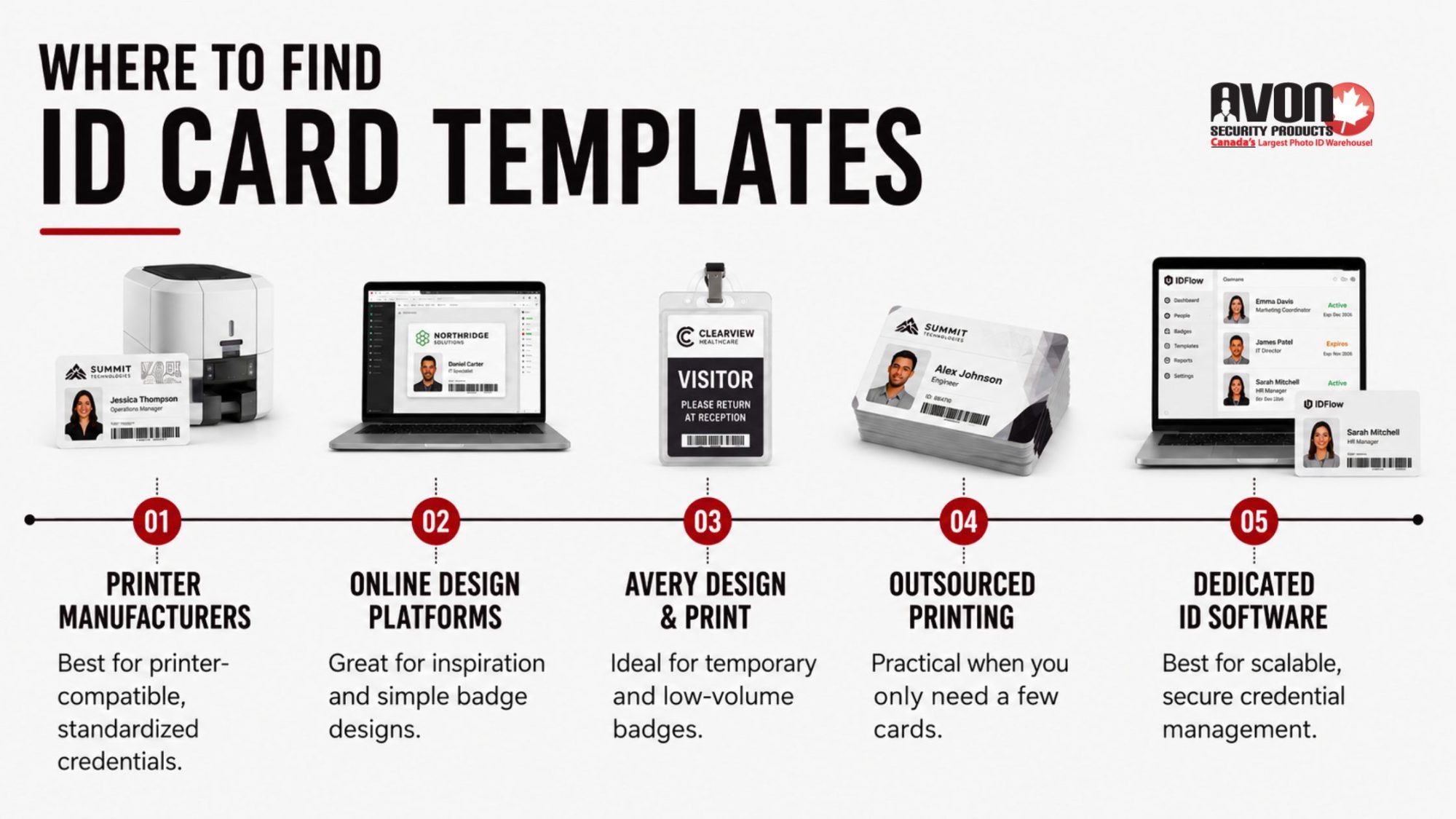
Finding the right template source depends on how your organization creates, prints, and manages ID cards. While some options are ideal for simple badge designs or occasional printing, others are better suited for organizations that need secure, scalable credentialing and long-term card management.
ID Card Printer Manufacturers
If your organization already has an ID card printer, the manufacturer’s template library is often the best place to begin. Most printer manufacturers provide layouts designed specifically for their hardware, helping reduce alignment issues and ensuring cards print the first time correctly.
Manufacturer templates are particularly useful when creating standard employee badges or replacing existing credentials. They’re also designed to accommodate features like magnetic stripes, smart cards, and dual-sided printing without requiring extensive adjustments.
A good choice for:
Organizations already using a professional ID card printer
Replacing existing employee credentials
Printing standardized employee badges
Maintaining consistent print quality
Online Design Platforms
Online design tools like Adobe Express and Canva can help explore layouts, experiment with branding, or create simple visitor badges. Their libraries include ready-made templates, editable colour schemes, font combinations, and drag-and-drop editing tools that make basic customization straightforward.
While these platforms are excellent for visual design, they aren’t built specifically for professional ID card production. Features such as database integration, variable data printing, access control credentials, and secure card encoding typically require dedicated ID card software.
A good choice for:
Design inspiration
Small projects
Temporary visitor passes
Simple photo ID layouts
Avery Design & Print
For organizations producing a limited number of identification cards, Avery’s online design tools provide a quick way to create printable badges using pre-built layouts. They’re particularly useful for conferences, volunteer events, visitor passes, and temporary credentials where long-term durability or advanced security features aren’t required.
As your card program grows, organizations often outgrow these basic tools in favour of solutions that support employee databases, photo capture, barcode generation, and access control integration.
A good choice for:
Temporary identification cards
Event badges
Volunteer credentials
Low-volume printing
Outsourced Badge Printing Services
If your organization only needs a handful of ID cards each year, outsourcing production can be a practical option. Many online badge providers allow you to upload employee information, photographs, and logos before printing finished cards on your behalf.
While outsourcing reduces the need for in-house equipment, it also limits flexibility. Updating employee information, replacing lost cards, or issuing credentials for new hires often requires another order and additional turnaround time.
A good choice for:
Small businesses
Seasonal staff
Organizations printing very few cards annually
One-time credential projects
Dedicated ID Card Software
As employee numbers increase, managing ID cards manually becomes more time-consuming and more prone to errors. Dedicated ID card software streamlines the entire process by combining card design, employee data, photographs, and printing into one centralized system. This makes it easier to issue new credentials, update existing cards, and maintain consistent branding across every location.
At Avon Security Products, we offer professional ID card software that supports everything from basic employee badges to advanced credentials with barcodes, QR codes, smart card technology, and database integration. Combined with our selection of ID card printers and blank PVC cards, organizations can build a complete in-house card production system that scales as their security needs grow.
Whether you’re printing a handful of employee badges each month or managing thousands of credentials across multiple facilities, having the right hardware and software helps reduce production time, improve consistency, and simplify ongoing card management.
Find ID Card Design Inspiration Faster
A professional ID card doesn’t have to start with a blank page. Today’s template libraries include hundreds of ready-made templates that help organizations create consistent, branded credentials in minutes instead of hours. Whether you’re designing employee badges, visitor passes, student IDs, or even a kids ID card template for schools or events, the right starting point can save time while producing a more polished result.
When comparing template libraries, look for features like:
Canva and Adobe Express for quick design inspiration and simple layouts.
A wide selection of ready-made templates for different industries and card types.
Built-in drag-and-drop design tools that make editing simple.
Professional font combinations and customizable colour schemes that align with your brand.
Access to curated elements, icons, and a library of photographs.
The ability to add your logo and other branded assets for a consistent look across every ID card.
While these tools are excellent for generating ideas and creating basic layouts, organizations issuing ID cards regularly often benefit from software built specifically for secure credential design and printing.
Customize Templates with Confidence
The best ID card templates don’t just look professional; they’re easy to edit as your organization grows. Whether you’re creating one card or hundreds, flexible template editing tools make it easier to update information while keeping every credential consistent.
Look for platforms that let you:
Upload your logo and other company branding.
Upload your own photos for employee or student credentials.
Insert text fields for names, titles, departments, or ID numbers.
Adjust layouts to fit different card types.
Resize elements without affecting print quality.
Change fonts to match your brand guidelines.
Change background colours or change colour schemes for different departments or locations.
Use intuitive editing tools that simplify updates.
Save your design as a reusable template for future cards.
Download for printing when your design is complete.
The easier a template is to customize, the less time your team spends recreating designs every time a new employee, visitor, or student needs a credential.
Choose Templates Built for Printing
A template may look great on screen but still produce poor print results if it isn’t designed for ID cards. Look for printable identification card templates built for standard CR80 card dimensions that support photo ID editing, upload your own images, and high-resolution printing. If you’re using an online editor or online ID maker, make sure designs are compatible with your ID printing kit and professional-grade printer. For longer-lasting credentials, lamination adds durability while helping cards maintain a clean, professional appearance.
Streamline Your Design Process—Explore Our Professional Software and Supplies
Choosing the right template helps speed up the design process, but the finished card is only as good as the equipment used to produce it. Professional ID card software, dedicated card printers, and quality printing supplies help create sharper, longer-lasting credentials while reducing wasted cards and reprints. From trusted design software to complete ID printing systems, Avon Security Products provides everything needed to produce professional, secure credentials. Speak with our team to find the right combination of software, printers, and supplies for your organization.
FAQs
What is an ID card template and how do I use it?
An ID card template is a pre-designed layout that includes placeholders for photos, text fields, barcodes, and branded assets like your logo. To use one, select a ready-made template from a trusted source, then customize text, colour schemes, and font combinations to match your organization. Upload your own images or choose from a library of photographs. Drag-and-drop design tools make editing simple. Save your design and download for printing or digital distribution through secure ID card software.
Where can I find free and customizable ID card templates?
Free and customizable ID card templates are available on platforms like Canva, Adobe Express, and specialized badge creators. These sites offer photo ID card templates, printable identification card templates, and kids ID card template options. Look for curated elements such as icon libraries, font combinations, and colour schemes. Most platforms include an upload feature for logos and photos. Use drag-and-drop design tools to adjust layouts, insert text fields, and resize elements before downloading your printable ID card template for professional use.
How do I create professional ID cards without design experience?
Creating professional ID cards without design experience is easy using online ID maker tools with ready-made templates. Start by selecting an ID card background that fits your brand, then add customized text, barcodes, and your logo. Drag-and-drop design tools let you upload your own images or choose from a library of photographs. Adjust font combinations and colour schemes for consistency. Most platforms include editing tools to change fonts, background colours, and element sizes. Save your design and download for printing or integrate with ID card software for bulk issuance.
What elements should every effective ID card include?
Every effective ID card should include a clear photo, name, ID number or barcode, and issue or expiration dates. Add branded assets like your logo and colour schemes to reinforce identity. Include customized text for roles or departments and consider security features like QR codes or holograms. Use font combinations that ensure readability and upload your own images for authenticity. Editing tools let you resize elements, change background colours, and insert text fields. Download for printing or manage digitally through secure ID card software for access control.
Can I print ID cards at home or do I need a professional printer?
You can print ID cards at home using printable identification card templates and a standard inkjet or laser printer. For durability, use an ID printing kit with lamination sleeves. However, a professional-grade printer delivers higher resolution and security features like microtext or holograms. Online editors and drag-and-drop design tools let you prepare files for either option. Upload your own images, adjust layouts, and change colour schemes before downloading. For high-volume needs, integrate with ID card software that supports batch printing and centralized management.
How do I customize an ID card template with my brand assets?
Customizing an ID card template with brand assets starts by uploading your logo, selecting your colour schemes, and choosing font combinations that match your style. Use editing tools to change background colours, insert text fields, and resize elements like barcodes or icons. Drag-and-drop design tools make it easy to upload your own photos or choose from curated elements. Most platforms allow you to save your design for future edits. Download for printing or integrate with ID card software to maintain brand consistency across all identification card templates.
What is the best way to design ID cards for multiple users?
The best way to design ID cards for multiple users is to start with a template that supports bulk customization. Use an online ID maker with a spreadsheet upload feature to add names, photos, and ID numbers quickly. Drag-and-drop design tools let you adjust layouts, change fonts, and insert text fields efficiently. Upload your logo and brand assets once, then apply them across all cards. Save your design and download for printing or manage through ID card software. Refer to guides on ID card templates for multiple users for streamlined workflows.
Are there ID card templates specifically for schools or events?
Yes, many platforms offer ID card templates designed specifically for schools, events, and membership groups. These include kids ID card template options, student photo ID card templates, and visitor badge designs. Look for curated elements like icons, colour schemes, and font combinations suited to educational or event branding. Drag and drop design tools make it easy to upload your own images, insert text fields, and resize elements. Save your design and download for printing or use ID card software to manage access and track attendance securely.
How do I add barcodes or QR codes to my ID card design?
Adding barcodes or QR codes to your ID card design is simple with most online editors and ID card software. Start with a template that includes a barcode placeholder or insert one using editing tools. Upload your own images if needed, then customize text fields for names and ID numbers. Drag and drop design tools let you resize elements and change their size or colour to match your brand. Save your design and download for printing. Barcodes and QR codes enhance security and enable quick scanning for access control.
What file formats should I use when downloading ID cards for printing?
When downloading ID cards for printing, choose high-resolution formats like PDF or PNG to ensure clarity and colour accuracy. Most online editors and drag-and-drop design tools export in these formats automatically. Verify that your printable identification card templates include bleed margins and crop marks for professional results. Upload your own images in high quality to avoid pixelation. Save your design in an editable format for future updates. For bulk printing, integrate with ID card software that supports standardized file outputs and centralized management.
How can I ensure my ID card design is both secure and visually appealing?
To ensure your ID card design is secure and visually appealing, combine branded assets like logos and colour schemes with security features such as barcodes, QR codes, or holograms. Use font combinations that enhance readability and upload your own images for authenticity. Drag-and-drop design tools let you adjust layouts, insert text fields, and resize elements precisely. Change background colours to reflect your brand while maintaining contrast for clarity. Save your design and download for printing or manage through ID card software for enhanced access control and tracking.
Where can I find inspiration for my next ID card design project?
Find inspiration for your next ID card design project by exploring template libraries on platforms like Canva, Adobe Express, or specialized badge creators. Browse curated elements such as icon sets, font combinations, and colour schemes tailored to different industries. Use drag-and-drop design tools to experiment with layouts, upload your own images, and test different branded assets. Save your design iterations for comparison.
Lanyards are an overlooked but important part of many businesses. When your company uses ID cards, passes, door cards and similar cards, then having an easy way to keep track of these items is essential. Many business require you to display your ID badge at all times, which makes a lanyard another part of your work uniform. Breakaway lanyards however are far more suited to certain industries than non-breakaway lanyards.
Why Use Breakaway Lanyards?
Breakaway lanyards differ from traditional lanyards in one key design difference. These lanyards when pulled on or caught have a breakaway clasp that separates, allowing it to be harmlessly removed from the wearer. This is an important safety feature, as in many industries a necessary lanyard can get caught on machinery, the wearer can be badly hurt.
Industries That Benefit From Breakaway Lanyards
There are many jobs there a lanyard may get caught on machinery or could be pulled on by another person, and in jobs such as these breakaway lanyards help assure safety and avoid injuries. If you work in any of the following professions breakaway lanyards should be seriously considered.
Industries that utilize heavy machinery. This can include engineers, repairmen, the printing industry, and auto mechanics. Essentially any job where one has to use equipment with a lot of exposed moving parts, where you have to bend or lean over open equipment to use, or where repairs to such equipment take place. These jobs can become very dangerous if a lanyard is caught in the machinery and you cannot break free.
Similar to the above industries, construction is another job where one is often exposed to situations where physical safety is a chief concern. In environments such as a construction site anything that can get caught on exposed materials and trap the wearer is a safety hazard. Breakaway lanyards will ensure that workers don’t get caught on anything, and don’t do damage to themselves or the worksite in the process.
Any type of job where a physical, combative style role may need to be taken, such as: a club or bar bouncer, security guard, or police officer. Many professions expose you to people who will grab or pull at your clothing or may try to start an altercation. In professions such as these breakaway lanyards keep employees safe from harm.
Education may not appear as hazardous as the above jobs however, it is one that has a potential for accidents due to working with children. If you work with children for example many may pull down on a lanyard as a joke or simply to get attention. Despite no malice being involved people have been hurt by having their necks suddenly jerked downward by someone pulling on a lanyard.
Lanyards are a very important part of workplace safety. If you’re looking for breakaway lanyards for your company there are several business devoted to selling ID equipment and accessories. Avon Security Products is one of the largest providers of identification based solutions in Canada. With over ten years of business experience and international clients in both the public and private sectors their success speaks for itself. When you need lanyards, ID cards, software, or any other identification solution Avon can help. Contact us today for more information!
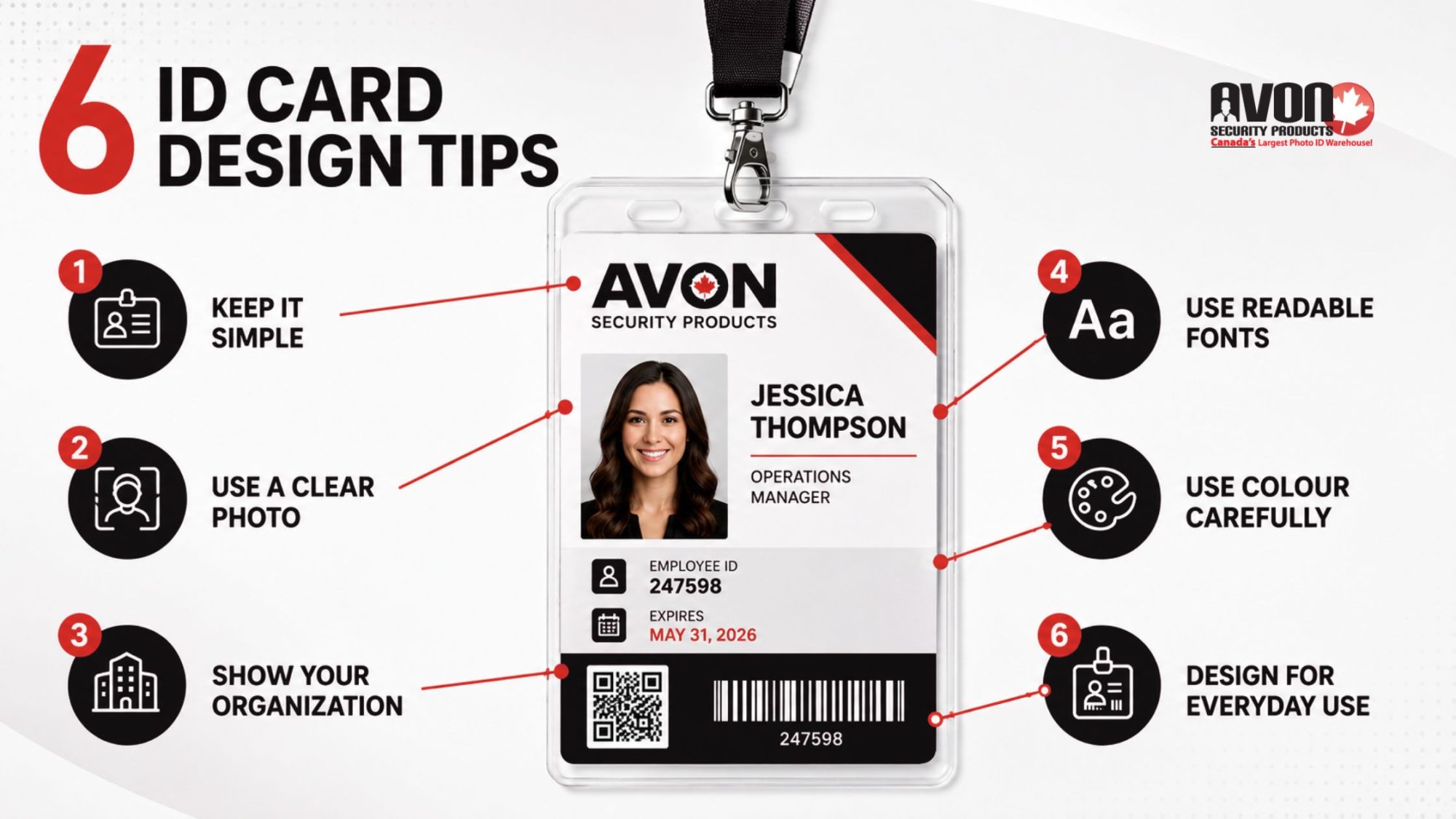
Keep your ID card design simple so key details like the name, photo, and role are easy to see at a glance.
Use a clear, high-quality photo and a readable font to improve employee ID card identification.
Include your organization’s name and logo to strengthen branding and help return lost ID cards.
Choose background colours that improve contrast and keep your ID cards professional and easy to read.
Design with card holders and lanyards in mind so your ID cards stay clear and usable in everyday settings.
A well-designed ID card helps employees, visitors, and security personnel identify people quickly, reinforces your organization’s brand, supports workplace security, and can even integrate with electronic access control systems. Your ID card represents your brand, enforces internal company policies, and forms the foundational front line of your physical security system. A rushed design can result in vital details being unreadable, security functions failing at the end-use point of view, or cards wearing out prematurely.
Designing effective ID cards requires balancing visual clarity, internal security features, organization branding, and everyday usability. These ID card printing design tips from Avon Security Products will help you create professional, secure, and highly visible badges that ensure your team can instantly verify identities and prevent security breaches, saving your organization from costly security errors.
Tip 1: Keep It Simple
An employee ID card often needs to communicate important information in seconds. Whether someone is entering a secure building, checking in a visitor, identifying staff during an emergency, or verifying credentials, every detail should be easy to locate at a glance. A clean design layout improves visual recognition, reduces mistakes, and helps your security system work more efficiently.
Rather than trying to fit every employee detail onto the card, prioritize only the vital information someone needs to identify the cardholder quickly. In most organizations, the must-have specifications include:
A recent photograph
Employee name
Job title or department
Organization name and organization logo
Expiry date
Employee ID number, barcode, or QR code (when applicable)
Organize these key features using a clear visual hierarchy so the photograph, name, and company branding are immediately recognizable. Supporting details should complement the design, not compete for attention.
Avoid overcrowding the card with unnecessary illustrations, excessive text, or decorative colours that make it hard to scan for the most important information easily. Likewise, leaving too much information sparse can make the design feel unfinished and unprofessional. The goal is a layout that is both readable and clear, giving security personnel, reception staff, and employees confidence that important details can be found instantly.
Tip 2: Use a Large, Clear Image
Your photograph is the single most important element on any photo ID card. If the image is difficult to recognize, outdated, or poor quality, the card becomes far less effective for identification, regardless of the security technology built into it.
For the strongest visual recognition, use a large photo size that clearly shows the employee’s face. Every image should be well-exposed, in focus, and captured against a plain, light-coloured background or white or a light background colour to eliminate distractions and improve contrast. Following baselineWestern ONECard Photo Standards ensures that the profile image is sharp and free from obstructive filters. Consistent photo placement across every card also creates a more professional appearance while making identification quicker for security staff.
For professional printing, photographs should be prepared at 300dpi resolution to maintain image quality. If logos or artwork are supplied separately, providing an Illustrator file (.ai) or Photoshop file (.psd) ensures branding elements remain sharp during production.
Many organizations also combine high-quality photographs with advanced security features, including barcodes and QR codes, magnetic stripe encoding, smartcard technology, holographic foil, or watermarks. When paired with a reliable data capture program or access control system, these technologies transform a simple photo ID into a secure credential that supports both identification and controlled building access.
Tip 3: Include the Name of the Organization
An ID card should instantly communicate who issued it. Clearly displaying the organization name and organization logo establishes authenticity, strengthens your brand, and helps distinguish authorized employees from visitors or contractors.
Strong branding elements also make day-to-day operations easier. Reception staff, security personnel, and other stakeholders can immediately identify employees, while professionally branded name badges reinforce confidence with customers, patients, students, and visitors.
Building Trust at First Glance
Beyond appearance, organizational branding plays an important role in workplace security. Clear company identification helps support internal company policies, simplifies information handling procedures, and improves the likelihood that lost cards are returned rather than discarded.
Organizations that issue secure credentials should also consider how the card supports their broader security system, balancing visibility with the privacy of information displayed. This is particularly vital in highly sensitive environments, matching the mandatory criteria outlined in theProfessional Appearance and Photo Identification Badges Policy. Depending on your workplace, that may mean limiting personal details on the front of the card while reserving additional information for secure databases or encoded technologies.
Tip 4: Use a Suitable Font
Prioritize Readability in Every Environment
Employee ID cards are designed for quick identification. Every name, job title, and access credential should be easy to read at a glance, allowing security personnel and employees to verify identities quickly and confidently. Choosing the right typography improves usability, reduces identification errors, and supports a more efficient security process.
When selecting fonts for your ID card design, keep these best practices in mind:
Choose a sans-serif font. Clean, modern sans-serif typefaces remain the most readable option for employee ID cards and name badges, especially when viewed from a distance or under different lighting conditions.
Use capital letters strategically. Reserve capital letters or ALL CAPS for key details such as employee surnames, department names, or access levels. Overusing all caps can reduce readability, so use them only where they improve recognition.
Create strong contrast. Text in classic black or other readable dark tones stands out best against lighter backgrounds, helping employees and security personnel locate vital information quickly.
Avoid decorative fonts and italics. Script fonts and excessive italics may look attractive on screen but often become difficult to read once printed at card size.
Consistent typography across every credential also creates a more professional appearance while making it easier for security teams to verify identities quickly. If you’re producing cards across multiple departments or locations, creating standardized templates within your ID card software helps ensure every card follows the same design standards and supports your organization’s branding and security policies.
Tip 5: Choose the Background Colour Carefully
Improve Visibility Without Sacrificing Your Brand
Background colour affects how quickly information can be read, how easily photographs can be recognized, and how effectively your security team can identify employees from a distance.
For most employee ID cards, a white or a light background colour behind the photograph and text provides the best readability. A plain, light-coloured background creates strong contrast with classic black or other dark text, ensuring names, job titles, expiry dates, and other vital information remain highly visible. By comparison, a background that is too dark or heavily patterned can reduce legibility and make important details harder to verify.
Background colours can also support your organization’s day-to-day operations. Many businesses use different colours to designate different levels of access, departments, contractors, visitors, or temporary credentials. This simple visual cue allows reception staff and security personnel to identify card types immediately without relying solely on printed text, matching institutional standards such as theCommissioner’s Directive on Identification Cards.
When incorporating your corporate colours, use them thoughtfully. Position branding around headers, footers, or logos while preserving a light background behind the employee’s photograph and text. This approach balances professional branding with the essential security specifications needed for quick identification, mirroring the official layout frameworks detailed in thePersonnel Identification Design Standard.
Tip 6: Consider Everyday Use
Designing an employee ID card involves more than choosing colours and layouts. Before sending artwork to print, review how the finished credential will be displayed, scanned, and used throughout your workplace. A few production checks can help avoid costly reprints while ensuring important information remains visible under generalGovernment Security Policies.
Many organizations issue credentials with ID card holders, lanyards, badge reels, or clips. These accessories should never cover employee information or branding.
White space along the border allows room for slot punches and holders.
Artwork doesn’t run right to the edge, where logos or text may become obscured.
The employee photo, organization logo, name, and expiry date remain fully visible once the card is inside its holder.
Access Control Compatibility
If your cards support building access, the layout should also accommodate the technology inside the credential.
Review the following before production:
Position barcodes and QR codes where they can be scanned easily.
Follow manufacturer recommendations for magnetic stripe encoding, RFID, or smartcard technology.
Verify that slot punch placement won’t interfere with the card’s activation method or other security functions.
Print a Sample First
Always review a printed sample before approving the full production run. Confirm that text remains easy to read, and photographs are printed clearly. Check that names, photographs, and expiry dates remain visible once the card is placed in its holder, and confirm that barcodes, QR codes, or other security features scan correctly.
Catching small issues before production can help avoid unnecessary reprints and ensure every credential is ready for daily use.
Take Control of Your Security with Customized ID Cards
Investing time into developing a thoughtful, professional ID card design layout directly protects the physical security and operational efficiency of your organization. By prioritizing simple layouts, strong contrast, clear typography, and practical card holder compatibility, you transform a basic piece of plastic into a powerful asset for your business.
Ready to streamline your badge production, configure cutting-edge ID card software, or discover the perfect photo ID system for your facility? Reach out to the Avon Security Products team today to explore how we can assist you in designing and streamlining your ID card solutions, ensuring enhanced security and efficiency for your organization.
FAQs
What background colour works best for ID cards with photos and text?
A plain, light-coloured background, ideally white or a very light neutral, delivers the strongest contrast for photographs and text, keeping names, job titles, expiry dates, and other vital information highly visible at a glance. A background that is too dark or heavily patterned reduces legibility and makes essential security specifications harder to verify, especially from a distance or under variable lighting. Use corporate colours around headers, footers, or logos while preserving a light background behind the photo and key details, and leave white space along the border so artwork doesn’t run right to the edge.
How do I choose fonts that stay readable on small ID cards?
Choose clean, modern sans-serif fonts for employee ID cards because they remain readable and clear at small sizes and under different lighting conditions. Use capital letters strategically; reserve all caps or ALL CAPS for surnames, department names, or access levels rather than setting all text in capitals, which can reduce readability. Ensure strong contrast with classic black or other readable dark tones on light backgrounds, and avoid decorative fonts and excessive italics that become difficult to read once printed. Consistent typography across templates supports your organization’s branding and security system.
What image resolution and file formats should I use for ID card photos and logos?
For professional in-house production, prepare employee photographs at 300dpi resolution to maintain sharpness on a large photo size and avoid pixelation. Supply logos and artwork as vector or high-resolution raster files, an Illustrator file (.ai) or Photoshop file (.psd), so branding elements and logos remain crisp during printing. Photos should be well-exposed, in focus, and captured against a plain, light-coloured background to improve contrast and visual recognition, with consistent photo placement across every card for a professional photo ID system.
How can I use colour to indicate access levels without hurting readability?
Many organizations use different colours to designate different levels of access, departments, contractors, or temporary credentials as a quick visual cue for reception and security teams. Apply colour coding to borders, bands, or background accents while keeping the area behind the photo and text on a white or light background colour so vital information stays highly visible. Avoid a background that is too dark or busy, and pair colour cues with clear text labels (for example, “Contractor,” “Visitor”) so essential security specifications remain readable and clear.
Which security features should I consider beyond the photo and barcode?
Beyond photographs and barcodes and QR codes, modern credentials can include holographic foil, watermarks, UV ink, microprint, magnetic stripe encoding, and smartcard technology to deter counterfeiting and tampering. Overt features like holographic elements are visible for quick checks, while covert features such as UV threads require a UV lamp and support your data capture program or security system. For high-security environments, consider encrypted RFID or contact smart chips that support secure, contactless access, layered with other security features for a robust photo ID system.
How do I ensure barcodes and QR codes scan reliably on ID cards?
Position barcodes and QR codes where they can be scanned easily by your data capture program, mobile capture system, or access readers without obstruction from ID card holders, clips, or lamination. Follow manufacturer recommendations for size, quiet zones (white space around the code), and placement to avoid scanning errors in your electronic access cards or photo ID system. Test printed samples with your actual scanners before full distribution, and avoid placing codes too close to edges or slot punches where artwork might run right to the edge and distort the pattern.
What layout mistakes make ID cards harder to use in holders and lanyards?
Common mistakes include letting artwork run right to the edge, which can hide logos, company name, or vital details once the card is punched and placed in ID card holders. Failing to leave white space along the border for slot punches can obscure the photograph, organization logo, name, or expiry date at the end-use point of view. Overcrowding the design layout with too many illustrations or dense text reduces scannability, while overly sparse information can look unprofessional and waste space needed for must-have specifications and key features.
How much information should I put on the front versus the back of an ID card?
Prioritize sparse information on the front: a recent photograph, employee name, job title or department, organization name and organization logo, expiry date, and an ID number or code when applicable. Use the back for secondary details such as emergency contacts, access instructions, or privacy notices to keep the front readable and clear for quick visual recognition. Limiting personal data on the front supports privacy of information while still meeting essential security specifications, and aligns with internal company policies and information handling procedures for your security system.
How do I align ID card design with my organization’s branding and policies?
Clearly display the organization name and organization logo on every credential to establish authenticity, strengthen brand recognition, and support your security system. Standardize typography, colours, and design layout across departments so name badges and access cards look consistent and professional for all stakeholders. Align the card with internal company policies and information handling procedures: for example, by limiting personal details on the front and encoding sensitive data instead, to meet essential security specifications and company policies while reinforcing organizational branding.
What accessibility considerations matter for ID card colour and contrast?
Badge colour contrast is critical for real-world readability, especially for people with reduced vision or colour perception. Aim for high contrast between text and background, ideally meeting or exceeding a 4.5:1 ratio for normal text and 3:1 for large text, so names, job titles, and vital details are easy to read at arm’s length. Avoid relying solely on colours to convey meaning (for example, access level) without supporting text labels, and test designs under typical workplace lighting to ensure your photo ID system is highly visible and inclusive.
How do I design ID cards that comply with Canadian privacy expectations for employee data?
Design ID cards to minimize personal information on the front, showing only what’s needed for quick visual recognition: photo, name, job title, organization name and logo, expiry date, and ID number or code. Under PIPEDA, limit collection and use of personal information to identified purposes, and avoid displaying sensitive data (home address, birth date, etc.) on the card itself. Store additional details in secure databases or encoded technologies, and document your information handling procedures and retention schedules to meet accountability, safeguards, and limiting-use principles for your security system.
What are best practices for reissuing and expiring ID cards without disrupting access?
Establish a clear policy that defines who gets cards, what access levels they grant, how long they’re valid, and what happens when cards are lost, stolen, or expired. Use a centralized credential management system to track issuance, monitor access activity, and automatically deactivate or reissue cards when roles change or expiry dates arrive. For printed cards with individual identity information, collect and destroy old credentials; for unprinted access cards, deactivate and reuse them after sanitization, combining visual photo ID with role-based permissions and regular access audits to maintain security without interrupting legitimate access.
How you choose to regulate access to your buildings or offices is a question involving finances, convenience and quality. When you think about security at a given property, you have to think about each potential threat or vulnerability that could exist for that specific security risk. One such important decision is whether you wish to use magnetic swipe cards for your staff and visitors or whether barcode cards are actually better. A close investigation of each will illuminate a better view of how the two options compare and contrast from one another.
Magnetic Swipe Cards
In this method, the magnetic strip on the card actually stores the information about the individual carrying the card. When the strip is read, the machine is able to use decoding software to uncover what information is contained within the strip. Magnetic swipe cards are real veterans in the security space, having been in mainstream public use since the 1960s. Access to information is fast, but a dedicated hardware reader is also required.
The downsides to the magnetic swipe cards solution versus a barcode scenario is the longevity of a single card’s viability and integrity. In many cases, magnetic swipe cards are best for use cases such as libraries and gyms. The reason for this is simply the frequency of swipes. A gym or library should have fewer uses by orders of magnitude, as opposed to in an office where card swipes could happen potentially dozens of times weekly. Frequent use and improper storage of magnetic swipe cards will likely yield you a damaged magnetic stripe rather quickly. If you have users of the cards who may have difficulty maintaining their card’s pristine condition, a laminated barcode card might be another option worth exploring.
Barcode Cards
With a barcode card, the logistics are slightly different than that of the magnetic. With this type of card, you also benefit from the comfort of knowing that it has been in use for over thirty years. On barcode cards, information is not actually stored in the card, but rather in a central database within your organization’s network. When the card is scanned by the reader hardware, it deciphers a value from the information in the barcode that the naked eye couldn’t determine. This value is a reference in your company’s internal network. That reference will point to a file containing the pertinent information to the cardholder. Provided there is no latency in the connection between the system scanning cards and the network containing user data, there will be a near-immediate feeling to how fast the data comes in.
You should be extra careful to make sure when ordering cards and readers that they are on the same barcode platform and that they are fully compatible. Newer barcode readers employ a form of ‘2D’ barcode reading, whereas older systems are on what is known as a ‘1D’ protocol, thus making it impossible for newer cards to be read on the older hardware.
Which is Best?
Which choice is best is going to come down to the specific use cases involved, the type of circumstances and the various variables at play, including budget. A simple and working understanding of how these technologies compare and contrast is fundamentally valuable to know in advance as a business owner or decision maker in the area of security hardware.
For more information on magnetic swipe cards or barcode cards, contact our team of security experts at Avon Security Products!
Clear ID photos are essential for ID cards, as they allow holders to be quickly and efficiently identified. If you’re struggling to take good ID photos of your employees, members or students, try these top 10 tips, which can help to improve the quality of your photos.
1. Use a Good Camera
It’s essential to use a camera with good enough specifications to take photos for ID cards. Choose a camera with a minimum of 12 megapixels. Most digital cameras and even some mobile phones meet this requirement, although older phones and some webcams may not.
2. Choose a Plain Background
Always take photos in front of a plain white or pale grey background. Avoid backgrounds that have texture or patterns and move furniture out of the way. Position the person roughly 3 feet from the background to minimize shadows.
3. Use Good Lighting
Where possible, take ID photos in daylight. Position the person so that the light falls directly on the face, rather than coming from the side or rear. If daylight is not an option, use an overhead artificial light, rather than the flash function on the camera.
4. Check the Camera Settings
Turn on auto focus, auto white balance, and auto exposure before you take your photo. Turn off the flash and any digital effects, such as filters.
5. Position the Person Correctly
Ask the photo subject to face the camera directly, without tilting or rotating the head. Frame the photo so that the face and neck take up the majority of the photograph, without being cut off by the sides of the frame.
6. Remove Head Coverings
Have people take off hats or helmets so you can see their faces and hair clearly. If someone needs to wear a headscarf for religious reasons, make sure the scarf isn’t casting shadows over the face.
7. Consider People Who Wear Glasses
People who normally wear glasses should wear them in their ID photos. However, it’s important to ensure that the eyes are visible. That means no tinted lenses or sunglasses. Line up the photo to avoid light reflections on the glasses and check that the glasses frames don’t cover the eyes.
8. Check the Expression
It’s easiest to identify a person from a photo that shows a neutral expression. Ask your photo subject to stare straight into the camera with open eyes and a closed mouth, without smiling or frowning.
9. Check the Photo
Check the photo immediately after taking it to ensure it fits the requirements. It’s very easy to snap an ID photo that is blurry or that shows the card holder with closed eyes. By checking the photo immediately after shooting, you can quickly take another if the first photo is no good.
10. No Photo Editing
Don’t edit the photo after you’ve taken it. If it’s not suitable, take a new one rather than trying to airbrush out shadows or other frustrating features.
By following these tips, you can take ID photos that are true likenesses of your employees, students or members. Use these photos on personalized ID cards so you can be sure that everyone on your site has the right to be there. For more information on ID photos or cards, contact us at Avon Security Products today!
When thinking of giveaways, door prizes, and similar party favors, you want something that’s lightweight, inexpensive, and puts forth your company image. ID badge reels may not be an item you think of when thinking of a good giveaway item but they are one you should consider. Avon offers a wide range of different ID badge reels to fit a multitude of industries. With customizations you can create ID badge reels that perfectly fit any giveaway, here is a brief overview of these different features.
Colours
Avon’s ID badge reels are available in several different colours. These include black, blue, purple, red, white, clear plastic, dark blue, green, and metallic. Colours are available in solid and many cases see through plastic as well. By customizing the ID badge reels’ colour you can match it to your company colours or the colours of the event your company is hosting. Certain colour combinations are striking to the eye and really make the reel stand out.
Shape
ID badge reels commonly come in circle shaped designs. However, if you’re looking for something different or that stands out there are other shapes and sizes available. Variance choices include heart shaped badges, squares, and rectangles. Heart shaped badges are especially fitting for charity or awareness events. While square and rectangle badges are unique and when combined with a company or event logo resemble a miniature business card.
Logos
Avon’s badge reels can be customized with logos or a picture. When handing out giveaway items it’s important to remember they also serve as a marketing tool. Your company logo or the event logo are an effective addition to your badge reels. By combining your logo on a solid colour reel using one of your company’s identifying colours you create something memorable. Clear colours can also create a dramatic effect. The same is also true when you reference the event you’re holding. A ribbon on a heart shaped reel or the logo of a worthy cause can also be highly memorable. Lastly, if you want something truly unique rhinestone reels are available and hard to miss.
Special Features
Some ID badge reels come with special features that make them unique. Options include reels with built in pens, no twist designs (these keep your ID facing forward), swivel clips, solid metal designs, a carabiner clip, and specialized reels strong enough to hold keys. With several additional features available you can make your reels specialized to fit your company image and the image of the event they’re hosting.
Avon’s badge reels are highly customizable and make for great giveaway prizes. When you buy from Avon you can rest assured you’re dealing with industry professionals. For more information on using ID badge reels as giveaways, contact us today!
When developing your employee handbook there are several different topics to cover including accepted behavior, company norms, performance of duties, use of company equipment, and more. One area of accepted behavior that is not be overlooked is the security policy. Your company’s security policy not only assures proper access but is also a matter of safety as well. The following security policy template is a general overview of what to include in your employee handbook.
Control Access
One of the most important parts of any security policy template is access control. In many businesses, schools, and government spaces access has to be carefully controlled. To make sure everyone who can gain access requires checks and balances. Naturally an in-house security team can help keep things ordered however, they can’t be expected to question everyone on site as this is both time consuming and unrealistic. The best method of access control is an ID card or security card system.
Security ID systems can take several forms from the highly simplistic to the highly complex. The simplest systems are temporary passes and signing in when you arrive. More complex systems can involve picture IDs for employees and pass cards restricting access via locked doors to various parts of the business. No matter what system you make use of your security policy template should cover in detail what the system is, how it functions, and what is expected from each employee.
Keep Detailed Records
Aside from controlling access, part of a proper security system is good record keeping. By keeping track of who is visiting or at the location at any given time you greatly increase safety. Much like your badge system, record keeping can range from the simple to the complex. The most basic way of keeping visitor records is a sign in book. A visitor arrives, signs in, and receives a temporary pass. These kinds of simple systems are good for businesses or locations that receive a lot of daily visits. However, for more complex industries a more advanced system may be required. Computer software systems can easily keep highly detailed records complete with a vast amount of visitor information. This allows careful screening of visitors which increases overall safety. When combined with a strong and well understood ID system this allows you to greatly control access to your property.
Responding To Emergencies
When things do go wrong having a well-defined and understood chain of command is essential. Employees should know exactly who to contact if things go wrong. Examples may include break and enters, theft, unauthorized access, evacuation, or in some cases non crime related events such as the need for medical attention. Emotions often run high during these events so knowing whom to contact and when allows a faster response when these events do occur. A key element of safety is being able to respond quickly when it is required and your security policy template should have a detailed course of action outlined when emergencies occur.
As is apparent there are several steps in developing a security policy template. No matter how complex or simplistic you system may be remember the following rules to assist in implementing security policies. Keep them current, welcome feedback to improve the system, make sure the system is understood, and make sure your security policy is a part of employee training so there are no questions about policy. For more information on company security policies and how to implement them, contact us at Avon Security!
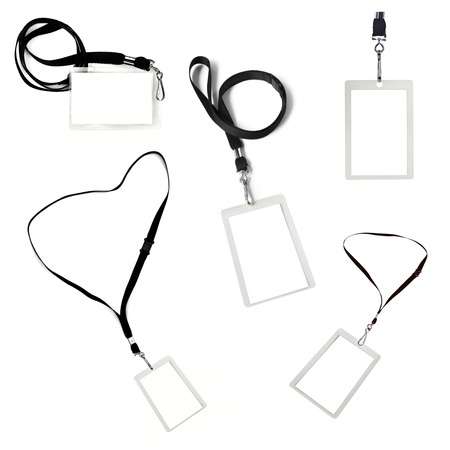
When using ID cards as part of your security system one question not to overlook is what kind of lanyard to use. Many people prefer wearing their ID and other important access cards on a lanyard for easy access and to make sure they don’t misplace them. When picking lanyards you have to choose between breakaway lanyards and non-breakaway lanyards. Now you may wonder what the difference is and why this is important. Here is a brief comparison between breakaway lanyards and non-breakaway lanyards and how to make that selection.
Non-Breakaway vs Breakaway
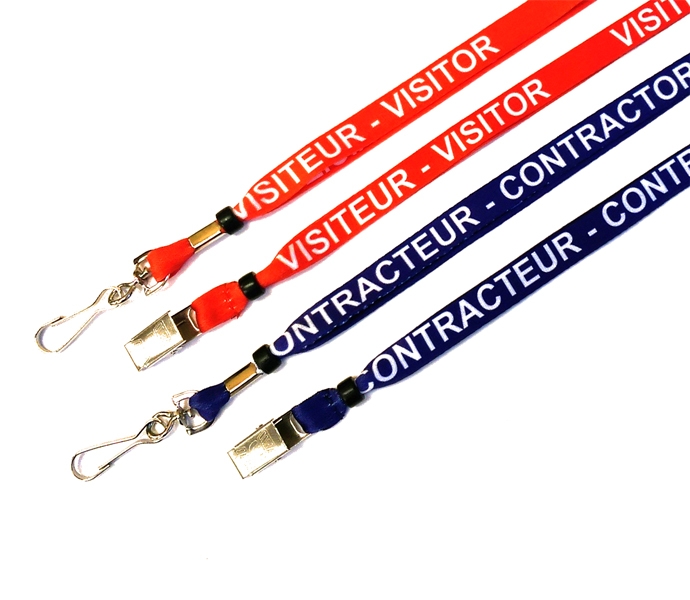
Lanyards can vary based on a variety of design concepts. The art, materials, thickness of the lanyard, and ways of holding ID cards can all vary. The key difference between breakaway and non-breakaway lanyards is the quick release clasp you find on a breakaway lanyard. These safety clasps come apart automatically if sufficient pressure is applied to the lanyard. For example if the lanyard is caught and you jerk your body away from it the clasp comes undone and you no longer have to worry about removing it. This is important safety feature as it can save you from injury or getting caught in dangerous situations.
How to Choose
Now you may be wondering how to choose between these two lanyard types and if the extra features are ones you need. When choosing lanyards the key reason you’d want to use breakaway lanyards is safety concerns. Many industries use machinery where a lanyard could easily catch onto a moving part if you have to bend over it to check on it or make use of it. If your business is one that has such equipment then breakaway lanyards greatly increase employee safety when accidents occur or their lanyards get caught on things.
This built in safety feature is also useful in other industries such as schools, hospitals, or prisons where a lanyard could be easily pulled on. By comparison if your industry is a relatively quiet one without moving machinery or interaction with the outside public then such safety features may not be needed. Non-breakaway lanyards work best in quiet industries such as offices, telecom centers, and the like.
As you can see lanyards with breakaway clasps can be very useful and an important part of your employee safety plan. No matter what kind of lanyards you use for your business you want to buy a quality product. Avon Security Products has been serving Canadian businesses, the public sector, and government facilities for many years along with customers all over the world. As industry leaders we sell the newest and highest quality security products on the market today. For more information, contact us today!
×
1
Product selection
2
Contact information
3
Review information
How many cards will you print a year?
Organizations needing to print less than 25 cards per year may find it more economical to use a card printing service.
Automatically print on both side of the Card?
Dual-sided printers usually cost significantly more than single-sided printers. In some cases a single-sided printer can be used to print both sides of an ID card:
If the back of every card is identical (i.e.: If lost, return to... This card is property of...), you can use a single-sided printer and pre-print a batch of card backs, often using an inexpensive black ribbon. Those cards can be sent through the printer a second time to include customized information on the other side. This method is not recommended for printing on technology cards due to possible damage it could cause to the card.
Even if the back and front is unique for every card, you can print one side of an ID card, flip it over and print the back. This is much more time consuming, and is not recommended for organizations that print a large volume of ID Cards. This method is also not recommended for printing on technology cards due to possible damage it could cause to the card.
Need to use the printer with an Apple MacTM?
Only a few models of ID card printers on the market are compatible with Mac computers.
There is currently not any commercial ID card software that is compatible with Mac computers. If at all possible, we recommend using a PC to manage an ID card system.

 1.866.458.6999
 Restarting Stagnant Growth
 Restarting Stagnant Growth
 Signs That Your ID Card Printer Needs An Upgrade
 Why Use Breakaway Lanyards?
 Magnetic Swipe Cards
 1. Use a Good Camera
 Colours
 Control Access
 Non-Breakaway vs Breakaway