Published: September 26, 2016
| Updated: September 23, 2024
Author: Team Avon
Nobody likes losing their badge. Replacing one takes time, effort and distracts you from doing your job. Anything that can prevent you from misplacing your badge is a worthwhile investment. We think that a retractable badge holder an ideal solution to keeping your badge at your side where you need it. Don’t believe us? Here are 4 reasons why you should consider getting a retractable badge holder that will ensure you never have problems with your badge again.
You Have Quick and Easy Access
When you need to present or swipe your badge, speed matters. That’s why a retractable badge holder is so ideal. You can grab it from your side and present swipe it immediately. Badge holders also have a large range and are very flexible, meaning you can reach in any direction with complete ease. You get the benefits of having your badge secured without any of the limitations.
It’s Not an Eyesore
If you have a badge on your chest or elsewhere on your uniform, it can be an eyesore. It clashes with outfits that are supposed to make you look like a professional. Fortunately, retractable badge holders are an ideal solution to this fashion faux pas. It dangles discreetly from your side, ready for when you need it. You can also choose a colour and style to suit your particular fashion sense.
Your Badge Remains Securely Fastened at All Times
Pockets, wallets and other unsecured badge storage solutions create the opportunity for risk. Even one that is clipped to your shirt has the potential to fall off, leaving you without your badge. Worrying about your badge lessens your peace of mind and distracts you from getting the job done. By investing in a retractable badge holder, you can rest assured that your badge is safe and secure at all times.
You Don’t Have to Worry About Pulling it in and Out of Your Pocket
If you keep your badge stored in your pockets, it can be a big pain. It can be cumbersome to have to reach in and out of your pocket every time you need to swipe or show your badge. With a retractable badge holder, your card rests at your side at all times, making it easy to access at any time you need to.
Avon Security Products has an amazing selection of retractable badge holders to suit your need. They come in a variety of lengths, colours and styles so you are sure to find something you’ll love. Browse our selection online today!
Published: September 19, 2016
| Updated: September 5, 2022
Author: Team Avon
If you are wondering which colours of backdrops for photography work best, you aren’t alone. Photographers have all sorts of opinions on the subject. A quick internet search will return a lot of differing advice, making it even harder to know which colour is best for you. Fortunately, we have put a list together for you to help. Although a lot of comes down to your clients’ needs and personal taste, there are some key differences. Here’s a list of most common backdrops for photography and what each can deliver.
Choose Between Paper and Muslin
Before you select a colour, it’s important to choose between paper and muslin when looking at backdrops for photography; each has its distinct advantages. Muslin backdrops are most often solid in colour and ideal for shooting serious portraits, like for photo ID badges. Paper backdrops are normally used only once, are cheaper and come in almost any colour or texture.
Go with Green for Photo Editing
Green is one of the most popular backdrops for photography and for good reason. If you use photo editing software, a green screen allows you to add in whatever background you like during editing. So by buying a green backdrop, you’ll get whatever background your heart desires.
White Works for Almost Anything
A white seamless paper background is a great option if you are on a tight budget. They are inexpensive, versatile and help make your photos look professional. White also goes with any other colour, meaning it will match whatever uniform or clothing your subject is wearing. It can also reduce the cost of printing your photos.
Same Goes for Black
Much like white, black is an inexpensive and versatile background option that is popular among photographers who need a simple background. It also helps brighten colours to make your subject really stand out. Like white, it can go with just about any colour combination.
Enjoy Versatility with Blue
Blue is also a popular backdrop colour for photographers and is known for inferring intellect and technical knowledge. But if your subject isn’t wearing colours well suited to a blue backdrop, it will negatively impact the quality of your photos.
Choose Gray for a Neutral Hue
Gray provides a neutral colour that draws attention to the subject rather than the backdrop. It works well when you need to lighten the background and can go with almost any colour your subject might wear. If you need backdrops for photography, Avon Securities has got them. Check out our selection online and get the perfect backdrop to suit your needs.
Published: September 12, 2016
| Updated: September 23, 2024
Author: Team Avon
Tired of having a slow and cumbersome manual sign-in process that distracts you from more important parts of your job? A barcode card scanner is the perfect way to speed up your badge scanning and sign in process, simplify data collection on who comes in and out, and make sure that only people with authorized access are allowed in. It works by reading the information on an ID card and sending it to a nearby computer. A software then takes care of the processing and analysis based on whatever parameters you have set. All this information is then stored in a database where it can be accessed at any time. Wondering how to implement this system at your organization? Follow this guide and get yourself the best technology in access control.
Purchase a Barcode Scanner
The first thing you need to do is decide which barcode card scanner is right you and purchase it. You might think all barcodes are the same, but many offer different features that can be very useful in certain situations. For example, the Metrologic 9520 offers a variety of innovative features like data editing and flash ROM. The best scanners also have a slot reader machine for barcodes, which delivers great speed and reliability, so you might want to consider investing in one that comes with this feature. But regardless, a scanner should be easy to operate so anyone can use it. We recommend you read online reviews before making any decisions as consumer feedback can be a good indication of effectiveness.
Connect to Your Computer Systems
Once you have decided on your barcode card scanner, next you will need to connect it to your computer system. Most come with cord that you simply have to plug directly into the machine or connect via your Wi-Fi network. It’s important to make sure you plug it into the right port. Some connect through a serial port or keyboard port while others use an interface device known as a wedge.
Install the Right Software
Because a barcode card scanner simply reads the data on a card and sends it to a computer, you need to have the right software that can process, analyze and store this data; there are lots of options available and some are even for free. Regardless, the most important thing you need to do is to ensure that it is compatible with the scanner you are purchasing – otherwise, your new system won’t work like it should.
Convinced a barcode card scanner is the right way to go for your signing in system? Avon Securities has a wide selection designed to meet your needs. Browse our selection online today!
Published: September 6, 2016
| Updated: September 23, 2024
Author: Team Avon
When you’re creating a marketing scheme for your business, you’re likely thinking of big picture tactics to bring you immediate and long term success; from social campaigns to print strategy and more. But, some of the most successful marketing campaigns simply begin with having people on the ground, handing out samples and branded merchandise that your target market can take back home or to work with them. Personalized lanyards are a fantastic way to invest a small amount of money into a product that can bring long term success.
Benefits of Personalized Lanyards
Utility
One of the key benefits of personalized lanyards is simply how helpful they are as an item with day to day use. Lanyards are the perfect item to attach home, work or even car keys to ensure that they’re not lost; they also work well to carry passes or scan cards to get into the office. Given that lanyards are so heavily relied on, it means that your branded lanyard will be seen and interacted with on a daily basis, making your company a namesake for the person using it.
Brand Visibility
When your personalized lanyard is in the hands of your consumers, your brand becomes visible to not only the owner but to anyone who interacts with the owner. Depending on how you choose to brand your lanyard, your logo may be visible from many feet away, making others recognize your company. These personalized lanyards are a simple way to get your name out to the public, both from the person who keeps the lanyard and those around them that see it in use.
Expense
>Compared to almost every other marketing tactic, personalized lanyards are an inexpensive way to get your name out there in the public. When you buy branded lanyards in bulk, you save significant amounts of costs for custom printing and for product fees in general. Additionally, hiring a small promotional marketing team to hand lanyards out at sporting events, concerts, or at large public centers will be a small expense in comparison to the sheer amount of interactions your brand will have with consumers.
Personalized lanyards are an excellent tactic in your marketing scheme to spend a small amount of money and get a large result. To learn more about getting your own branded lanyards for your business, contact us at Avon Security Products today!
Published: August 22, 2016
| Updated: November 4, 2026
Author: Team Avon
Key Takeaways
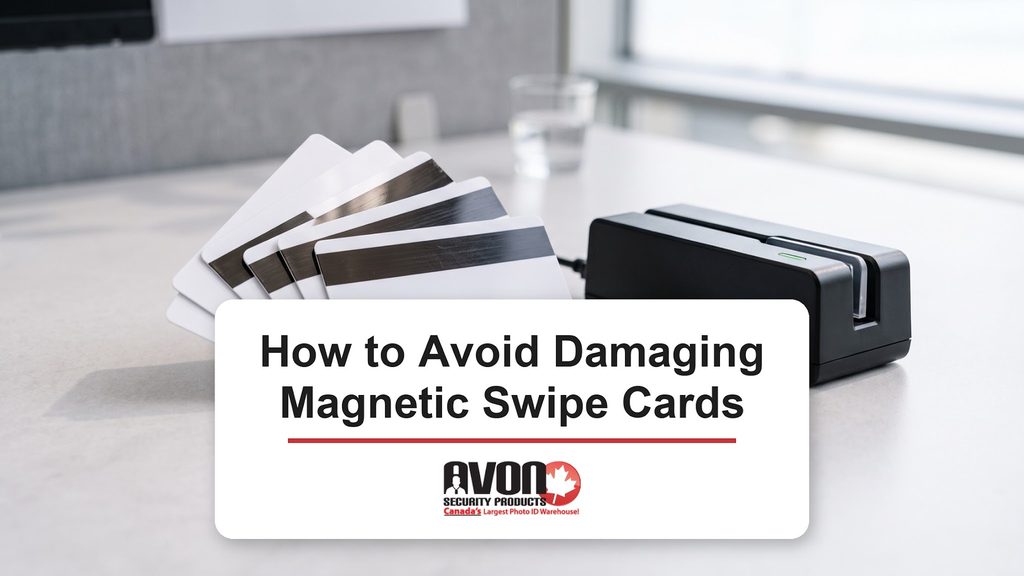
A magnetic swipe card stores its data in a stripe of tiny iron-based particles, so strong magnets and deep scratches are what usually ruin it.
Keep badges away from desk speaker magnets, hard drive degaussers, magnetic cabinet latches and handheld radios, because each can erase the stripe.
A card that only works after several swipes, or works on some readers but not others, usually has a scratched or partly erased stripe.
High coercivity (HiCo) stripes need a much stronger magnet to erase than low coercivity (LoCo) stripes, so HiCo cards last longer in daily use.
You can re-encode your own ID or membership cards with a magnetic stripe encoder, but a damaged bank card has to be replaced by your bank.
Magnetic stripe cards remain a core credential for Canadian businesses, hospitals and educational institutions, carrying the data behind access control, time and attendance tracking and campus card programs. For operations, security and facility managers, each card is part of the infrastructure that moves people through the building, records hours and pays for services on campus.
When a card suddenly stops reading, the cost goes well beyond one replacement badge. Staff queue at entry points, shift records go missing, and HR and IT help desks absorb a stream of tickets for lockouts and manual corrections. This guide from Avon Security Products explains how the stripe stores data, what damages it in real workplaces, and how to protect, fix and store magnetic stripe credentials so your program keeps running.
How Does the Magnetic Strip on a Card Work?
The magnetic stripe is a thin band of tiny iron oxide particles, which are microscopic bits of magnetic material set into a layer on the card. Encoding is the process of writing data to the stripe, and an encoder does it by flipping the magnetic direction of those particles into a pattern that represents numbers and letters.
The stripe is divided into tracks, which are parallel lanes that each hold their own line of data. A standard card can hold up to three tracks, and the reader turns each magnetic pattern back into data such as an account number or an employee ID. Anything that scrambles that pattern or scrapes the particles off the card will stop it from reading.
What Damages a Magnetic Strip?
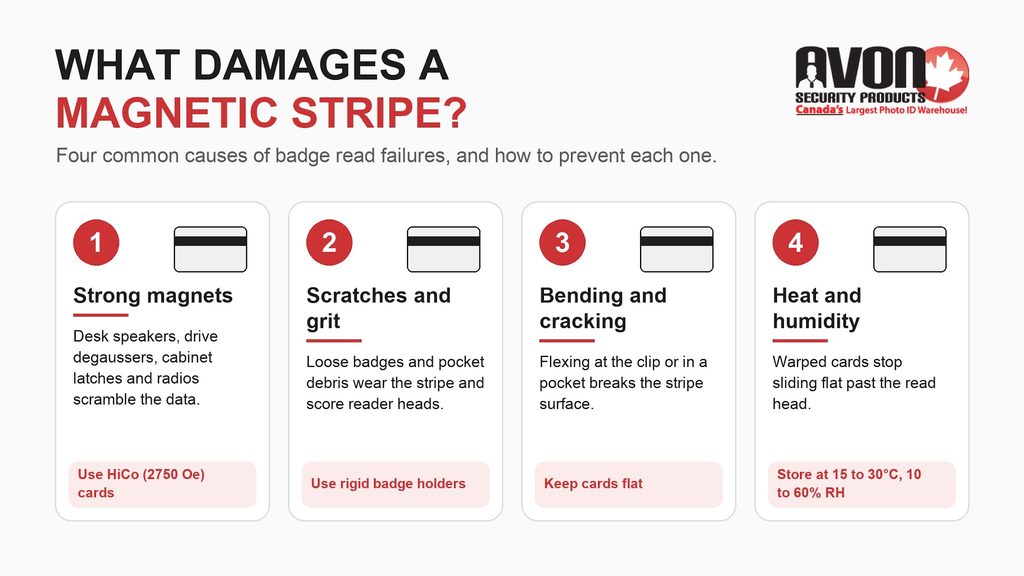
Most damaged stripes come from one of four causes, and each of them is easy to avoid once you know about it.
Strong magnets can rearrange the particles in the stripe and wipe out the data, which is why a card can fail even though it looks perfect.
Scratches from keys, coins, and grit wear away the magnetic layer, and a reader can’t pick up data from a stripe that has been scraped thin.
Bending and cracking break the stripe surface, so a card carried in a back pocket for months often fails along the fold line.
Heat, such as a card left on a car dashboard in summer, can warp a PVC card so it no longer slides flat past the reading head.
5 Ways to Avoid Damaging Magnetic Swipe Cards
These five habits have been on this page since we first published it, and they still prevent most of the everyday damage that stops a card from reading.
Keep Magnets Away
This is the most important habit, because a strong magnetic field can scramble the data on the stripe and leave the credential useless even though it looks undamaged. In commercial and institutional workplaces, the risk comes from everyday equipment: high-output desk and conference speaker magnets, hard drive degaussing equipment in IT workshops, magnetized industrial tools, magnetic cabinet latches, and handheld radios and security equipment carried by staff. Each can create a localized field strong enough to corrupt a standard card, which is why organizations that want fewer access disruptions and help desk tickets deploy high coercivity (HiCo) card stock.
Badges are also exposed through the way they’re worn and stored at work. A badge clipped beside a two-way radio, left on top of a desk speaker, dropped into a drawer with magnetic closures, or carried into an IT workshop where drives are degaussed can fail without any visible damage. High coercivity stripes, defined in the ISO/IEC 7811-6 standard, are built to resist much stronger fields than low coercivity stripes, so HiCo cards are the practical defence for badges that move through these environments.
Don’t Keep Your Card Loose
Keeping your card loose in a pocket, purse, or glove box is a sure way to cause problems. Keys, coins, dirt, and grit all scratch the stripe as they rub against it, and enough scratches will stop the stripe from reading. This is also the simplest answer to protecting a debit card from scratches, since a card slot in a wallet keeps it away from everything that wears it down.
Don’t Let Two Credit Cards Rub Together
When you store several magnetic swipe cards together, keep them facing the same direction so the stripes don’t grind against each other. Contact between two stripes is unlikely to erase either one, and the international standard for high coercivity stripes, ISO/IEC 7811-6, is designed to limit damage to other stripes by contact. The real risk is friction, because stripes that rub together every day wear down just like cards kept loose.
Get a Card Protection Sleeve
A protective holder is part of the wider hardware system, because it protects the reader as well as the card. When a stripe is left exposed, airborne dust and pocket grit settle on it, and every swipe drags that abrasive debris through the reader channel. Over time, the debris scores the delicate magnetic read head, so read failures spread from one card to every badge that uses that door, and the reader has to be replaced early. Heavy-duty vinyl or rigid open-faced badge holders keep the stripe clean and the card flat, which extends the life of both the credentials and the readers across your facility.
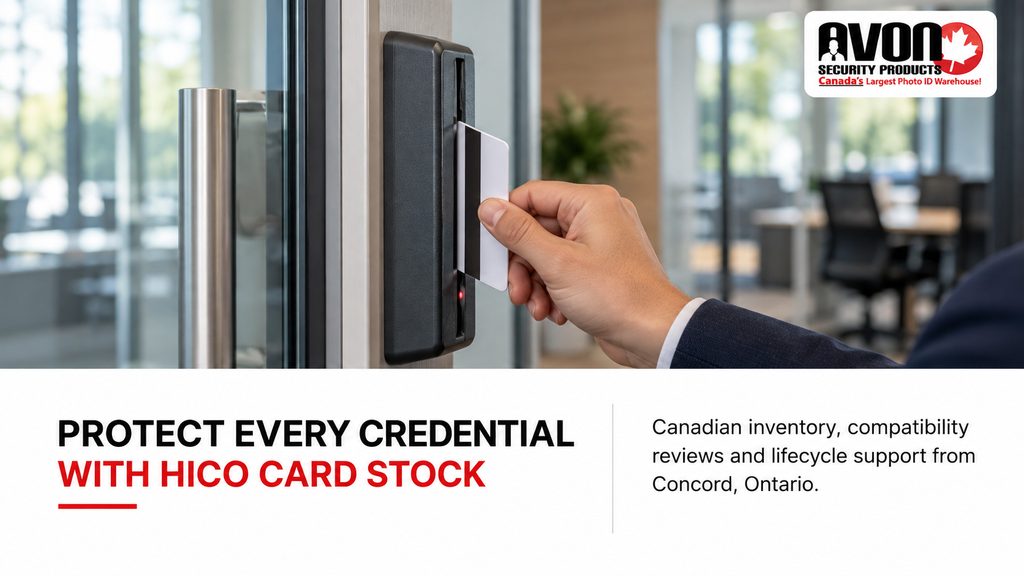
Buy a Hi-Coercivity Card
Coercivity is a measure of how much magnetic force it takes to change the data on a stripe, and it’s measured in oersteds (Oe), a unit of magnetic field strength. High coercivity cards, known as HiCo, need a much stronger magnet to erase, so they resist most of the everyday magnetic exposure that wipes out cheaper cards.
The Fargo 81751 UltraCard PVC cards we sell carry a 2750 oersted stripe, and the Fargo 81762 UltraCard III composite cards are also high coercivity, which makes either one a safer choice for cards people carry every day.
HiCo vs LoCo: Which Magnetic Stripe Is Harder to Erase?
Card manufacturers make stripes in two strengths. HID Global, which makes Fargo cards, lists its UltraCard blanks with either a low coercivity 300 Oe stripe or a high coercivity 2750 Oe stripe.
Card Technology Type
Magnetic Field Rating (Oersteds)
Physical Ribbon Substrate Appearance
Enterprise Operational Use Case
HiCo (high coercivity)
2750 Oe
Dark black stripe
Structural resilience for multi-year corporate access, healthcare badges and university campus cards
LoCo (low coercivity)
300 Oe
Lighter brown stripe
Low-cycle, temporary access only, such as hotel room keycards and single-day visitor passes
If your cards keep failing after a few months, switching from LoCo to HiCo is usually the simplest fix. Our guide to PVC cards explains the card material itself, which matters just as much for a card that bends or cracks.
Signs Your Magnetic Strip Is Damaged or Demagnetized
A demagnetized card often looks perfectly normal, so the clues usually come from the way card readers respond to it.
The card only reads after you swipe it several times, or only when you swipe slowly.
The card works at one reader but fails at another, which usually means the stripe is weak and only the most sensitive reader can still pick it up.
A payment terminal asks you to insert or tap the card after a swipe fails, which points to the stripe and not to your account.
You can see deep scratches, peeling, or a dull, scuffed band across the stripe.
If the black strip on your debit card is visibly scratched or peeling, the damage is physical, and no amount of cleaning will bring the missing material back.
How to Fix a Card Whose Magnetic Strip Won’t Swipe
Start with the simplest fix and work your way up the list if the card still won’t read.
Clean the stripe gently with a soft, lint-free cloth, because dirt and residue can stop a healthy stripe from reading.
Try another reader, since a dirty or worn reading head at one terminal can look exactly like a damaged card.
Re-encode the card if it’s one your organization issued, such as an employee ID or a membership card, by writing the data back onto the stripe with a magnetic stripe encoder.
Replace the card if the stripe is scratched or peeling, or if it’s a bank card.
You can’t remagnetize a card with a household magnet, and trying will only scramble the stripe further. A bank card has to be replaced by the bank that issued it, although most Canadian debit and credit cards also carry a chip you can insert or tap in the meantime.
For credentials your organization issues, re-encoding is an internal lifecycle tool that keeps your system running. When ID card printers are fitted with an inline magnetic stripe encoding module, security managers can print the high-resolution card design and write the access data to Track 1 or Track 2 in a single pass. That removes the manual step of encoding cards separately, so there’s no double handling of unencoded stock and no printed badge goes out with a blank stripe. The Fargo DTC1250e, Matica MC310 and Magicard 300 all list magnetic stripe encoding as an option, so each printer can act as a scalable issuance engine within a complete credentialing environment.
How Should You Store Blank Magnetic Stripe Cards?
Blank cards can be damaged before they’re ever printed, so storage is part of running a badge program. Canadian facilities see sharp humidity swings between dry, heated winters and humid summers, and PVC and composite cards stored in an uncontrolled closet can warp or develop surface defects that affect printing. Evolis recommends keeping its magnetic stripe cards between 15 and 30°C at a stable 10 to 60% relative humidity, away from dust, direct sunlight, and chemicals, so treat that range as a firm rule and keep card stock in a climate-controlled supply closet or server room. Stable conditions also prevent static that makes cards cling together, which causes feed errors, printhead damage, and ribbon breakage inside the printer.
Keep unopened packs in their original wrapping and well away from speakers or anything else with a magnet inside. Once a pack is open, handle cards by the edges so skin oils don’t reach the print surface. If you’re choosing cards for a new program, our article on PVC security ID cards covers what each card type is good for.
Where to Buy HiCo Magnetic Stripe Cards in Ontario
Avon Security Products is a Canadian security systems partner with centralized inventory in Concord, Ontario, supplying HiCo blank magnetic stripe cards to organizations across the country with no duties or brokerage fees. The range covers CR80 30 mil PVC cards with a 2750 oersted stripe, cards with a Track II stripe, and 60/40 composite cards with a HiCo stripe for retransfer printers, so one partner can keep your card stock consistent across every site.
Corporate procurement officers and facility engineers can contact our team or call 1-866-458-6999 to reach Avon’s technical consulting desk for a system integration review, hardware compatibility matching, or recommendations for a multi-facility badge rollout.
Frequently Asked Questions
Can environmental magnetic exposure disrupt organizational access control badges?
Yes, strong workplace magnetic fields can erase or scramble the data on a badge’s magnetic stripe, and the card then fails at the reader even though it looks undamaged. Common sources in institutional settings include high-powered desk speaker magnets, hard drive degaussers in IT workshops, magnetic cabinet closures and handheld security equipment. When an employee’s badge fails at a secure entry gate, it creates a queue, a manual override and a help desk ticket, which is why organizations issue HiCo cards that resist far stronger fields.
Can magnetic stripe badges demagnetize each other?
Rarely, because ISO/IEC 7811-6 limits how much one high coercivity stripe can affect another, so stacked badges are very unlikely to erase each other. The real risk in badge issuance is friction. Badges stored loose or stacked rub together, and the friction scratches the magnetic particle layer until readers can’t decode the data track. To keep operations moving as your program scales, store issued and spare badges in rigid anti-print-transfer badge holders or open-faced card dispensers that protect the stripe surface.
How do you fix a demagnetized card?
Start by testing the badge at several reader stations. If it fails everywhere, the magnetic track is weak or erased; if it fails at only one door, that terminal’s reading head is likely dirty or misaligned and needs cleaning or service. To restore a weak badge, use the inline magnetic encoding module in your desktop ID card printer, such as the Fargo DTC1250e, Matica MC310 or Magicard 300, to rewrite the data string to Track 1 or Track 2. The badge works again without throwing away expensive card stock.
What is the difference between HiCo and LoCo magnetic stripe cards?
Coercivity measures the magnetic force, in oersteds (Oe), needed to alter or erase the data stored on a stripe.
HiCo, 2750 Oe: black stripe, built for multi-year corporate access cards and employee badges.
LoCo, 300 Oe: brown stripe, meant for short-term, low-cycle uses such as hotel keys.
For an organization, HiCo is the lower total cost of ownership because it resists accidental erasure and prevents constant reissue costs as your security program grows.
Where can I buy HiCo magnetic stripe blank cards in Ontario?
Avon Security Products supplies complete credentialing programs from its centralized inventory in Concord, Ontario, with no duties or brokerage fees for Canadian buyers. Its HiCo magnetic stripe range fits the wider printer setup:
Standard PVC with a 2750 Oe stripe for direct-to-card printers.
60/40 composite with a HiCo stripe for high-heat retransfer systems.
Track II cards for time and attendance and access control systems.
Facility managers can contact Avon’s expert team for a personalized system compatibility review.
Published: August 16, 2016
| Updated: September 1, 2026
Author: Team Avon
Key Takeaways
A broken printer ribbon can often be repaired with transparent tape if the tear is clean and the ribbon is still usable.
Pause the print job, remove the ribbon carefully, and inspect for tears, tangles, and ribbon misalignment.
Check for printhead heat, sensor issues, and driver settings if breaks keep happening.
Dust, debris, and poor card alignment can damage ID card printer ribbons and cause print errors.
Replace the ribbon if the damage is severe or the repair does not restore smooth printing.
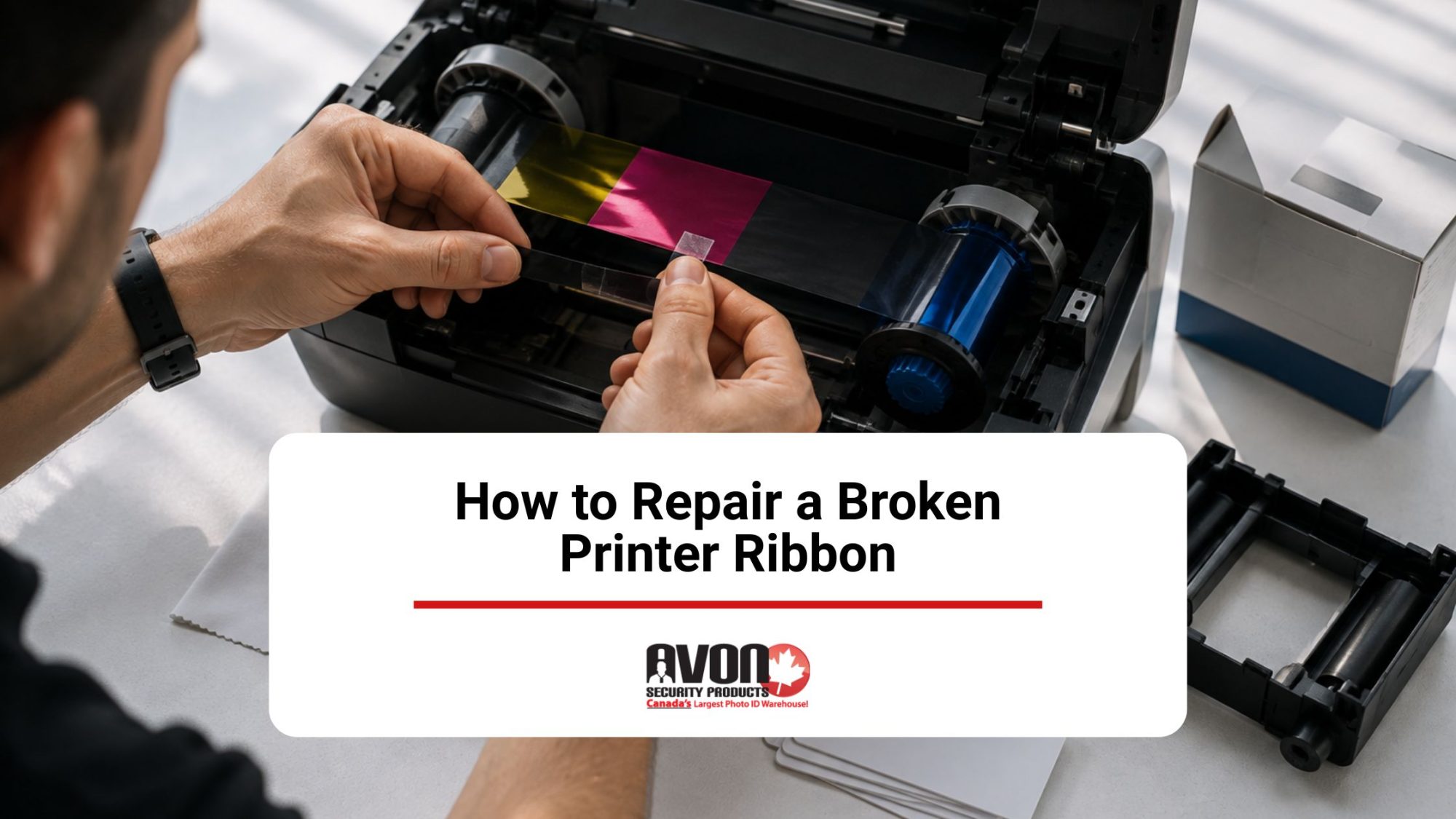
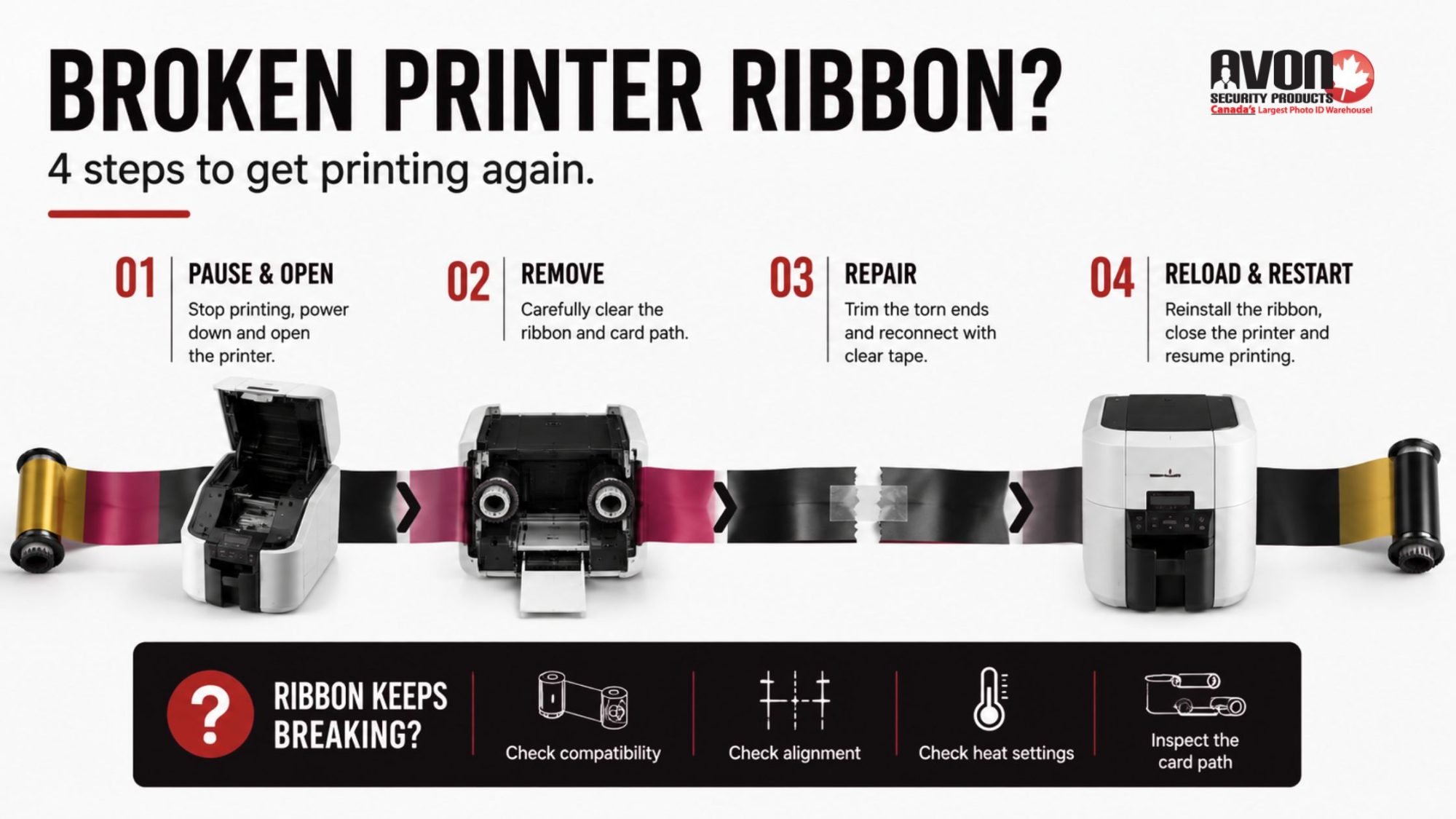
In many cases, a broken printer ribbon can be repaired rather than immediately replaced. A clean break can usually be trimmed and carefully rejoined with transparent tape, then wound forward so the repaired section sits securely on the used-ribbon spool. This restores the ribbon’s tension and allows you to test whether it can move smoothly through the printer again.
It’s equally important to understand why the ribbon broke. A ribbon that catches, wrinkles, or runs unevenly through the printer can eventually tear, while dust or debris inside the card path can interfere with its movement. If breakage continues after a repair, the cause may be excessive printhead heat, incorrect printer settings, printer movement issues, or a sensor that is no longer reading the ribbon correctly. Finding the underlying issue helps prevent another break and determines whether the printer ribbon can remain in use or should be replaced. Fortunately, repairing a broken printer ribbon does not require advanced technical know-how or any other kind of special skill set. It is something anyone can do. See our steps below.
Step 1: Getting To The Broken Printer Ribbon
If your printer ribbon has broken, first you need to pause the current print job immediately if jobs are pending in your printer queue. Deleting them is not necessary. Next, turn off your printer, open it up and unlatch the print head.
Step 2: Removing It
Next, you need to remove the ribbon cartridge or supply on the right side, and then on the left side you need to take up the spools. When taking out the spools, it is crucial that you know which spool is which. Then you should take the ribbon out from the platen roller. If the ribbon is stuck onto the card, you need to take the extra ribbon out of the card path’s way. At this point, there should no longer be any cards or ribbon in the printer’s card path.
Step 3: Repairing
For our third step, find a flat surface for your cartridge. Make sure it is clean first. Then, find the two ends for the take-up and supply spools. You also want to make sure the two ends are as straight as possible, so it’s best to cut away any excess ribbon.
Now you are ready to start the repairs. Pull the tape at each end until they overlap. Then all you need to do is tape them together with Scotch tape. It really is that simple! If you find that there is a bit of used ribbon on the take-up, taping directly over the used ribbon won’t cause any problems.
Step 4: Restarting Your Job
It’s finally time for you to get back to your print job. Put your printer ribbon back inside the printer and don’t worry about the colour position. The printer can automatically put the ribbon in the right position after you have inserted it. Then, close the printer properly by latching the printhead down and shutting the cover. Turn the printer back on, and everything should be good to go. Your job should restart automatically.
Troubleshooting ID Card Printer Errors
If your printer ribbon continues to break, the problem may be related to ribbon compatibility, the printer itself, or the cards being used. Checking your printer model and ribbon specifications with Avon Security Products can help rule out an incompatible ribbon before you troubleshoot the printer. Here are the most common issues to check:
Restore Driver Settings
Sometimes, if the default settings have been changed, the ribbon can get too hot, and this can lead to it breaking. Restoring the print driver to its original settings can do the trick.
Examine Blank Cards for Any Kind of Debris
Sometimes, when pre-punching your cards before you print them, debris can enter the punch hole and tear the ribbon. In general, it’s best to print over your cards and then punch them.
Don’t Print Too Close to the Card’s Edge
When printing on ID cards, make sure you have a good ID card layout established and ensure the card is aligned properly to avoid printing on the edge of the card. Printing on the edge of your card with a direct-to-card printer can cause the ribbon to snap. The way to avoid this is to modify the unprinted border in your ID card software.
Incorrect Ribbon Compatibility
Incompatible ribbon can contribute to tearing or breakage. A ribbon that is not designed for your specific ID card printer may not feed or maintain tension correctly, which can cause wrinkling, misalignment, or excessive stress as it moves through the printer.
Clean Your Printer
Using a cleaning set designed for your model, you can clean your printer to help prevent printer ribbons from breaking. You also need to recalibrate the ribbon sensor afterwards, and double-check that the ribbon type you are using is compatible with your printer.
Keep Ribbon Problems from Interrupting Your Print Jobs
A clean ribbon tear may be an easy repair, but repeated breakage can indicate a problem with ribbon alignment, printhead temperature, calibration, or the card path. Continuing to replace ribbons without addressing the cause can mean more wasted supplies and interrupted print jobs. Contact us at Avon Security Products for help troubleshooting your ID card printer, confirming ribbon compatibility, or determining whether replacement supplies or printer service are needed.
FAQs
Can every broken ID printer ribbon be repaired?
A clean break can often be repaired temporarily by aligning the ribbon ends and joining them with transparent tape. Trim ragged or damaged portions with scissors first, then press the tape firmly across one side without creating folds. Keep the repaired section taut and even as it winds onto the used-ribbon spool. The repaired area should be covered by another layer of ribbon where possible. Replace the ribbon instead if it has multiple tears, severe tangles, or extensive damaged portions.
How do I access a broken ribbon safely?
Pause the printer queue, switch off the printer, and follow the user manual before opening the ribbon compartment. Unlatch the print head and carefully remove the ribbon cartridge or supply spool. Identify the take-up spools before lifting them out, then free the ribbon from the platen roller and card path. Remove any loose film or debris, but do not force a stuck component or touch the printhead unnecessarily. The exact access method may vary by printer model.
What should I check when assessing ribbon damage?
Inspect both ribbon ends for clean tears, fraying, creases, and excess ribbon. Check whether the film is twisted, whether the take-up spool is winding evenly, and whether the ribbon follows the correct ribbon path. Repeated breaks may indicate misalignment, a worn component, incorrect heat settings, or ribbon sensors that need calibration. If the film is badly torn or contaminated, replacement is usually more reliable than repair. Consult the user manual for model-specific inspection and ribbon calibration steps.
Can debris on blank cards cause ribbon breakage?
Yes. Debris on blank cards, including particles left after pre-punching, can obstruct the card path or contact the ribbon and cause tears. Examine cards before loading them and remove damaged or contaminated stock. Avon recommends printing before punching cards when possible, because pre-punching can allow debris into the openings. If the issue continues, test a fresh pack of compatible cards and clean the printer according to the manufacturer’s instructions. This may help prevent repeated ribbon breakage.
How does printer alignment affect a ribbon?
Poor alignment can pull the ribbon unevenly, create wrinkles, or move it toward the card edge, increasing the risk of breakage. Check that the cartridge, take-up spool, and ribbon path are seated correctly before closing the printer. With a direct-to-card printer, leave an appropriate unprinted border rather than attempting edge-to-edge printing. An alignment test card and the printer’s top of form setting can help identify positioning problems. Follow your model’s user manual for exact alignment adjustments.
When should I replace a ribbon instead of repairing it?
Replace the ribbon when it has repeated tears, severe creasing, melted areas, extensive tangles, or too little usable film remaining. Choose a compatible ribbon cartridge made for your exact printer model and confirm its capacity and colour configuration. Before installing it, remove debris from the card path, check the ribbon sensor, and review heat settings and driver settings. Do not cut the ribbon or attempt a repair simply to avoid replacement when the damaged film could affect printing or harm the printer.
Can incorrect driver settings make a ribbon overheat?
They can. Settings that increase ink output or printhead power may raise the temperature of your print head and contribute to ribbon overheating or ribbon breakage. Restore driver settings to their default settings or original settings, then print a test card before making further changes. If you use a Zebra ZXP Series 7, Avon also recommends checking for current drivers and firmware and adjusting print head power when appropriate. Use model-specific guidance rather than guessing at heat settings.avonsecurityproducts+1
How often should I clean an ID card printer?
Follow the cleaning schedule and maintenance schedules specified by your printer manufacturer. Many card printers should be cleaned whenever a new ribbon is installed, while heavily used equipment may require more frequent attention. Use cleaning kits designed for the model to remove debris from the printhead, rollers, and ribbon path. After cleaning, perform recalibration or recalibrate the ribbon sensor if your printer requires it. Never use improvised solvents or tools that could scratch the printhead or contaminate the card path.
What should I do after installing a repaired or new ribbon?
Reinstall the cartridge or spools with the ribbon routed correctly and wound taut and even. Secure the printhead, close the cover, and restart the printer. If required by your model, calibrate the ribbon sensor before sending a job. Confirm that the print driver and printer’s properties still use the original settings, then run a test print. Check the printhead and ribbon path if the result is incomplete, misaligned, or the ribbon does not advance normally after installation.
Why does a ribbon keep breaking after a repair?
A repair addresses the tear but may not correct the underlying cause. Persistent issues can result from debris, incorrect alignment, edge printing, unsuitable cards, excessive printhead heat, outdated firmware, or a faulty ribbon sensor. Check the card stock, clean the printer, verify the ribbon path, restore driver settings, and recalibrate the ribbon sensor where applicable. If ribbon breakage continues after these steps, stop repeated repairs and contact Avon Security Products for professional assistance and technical support.
Are generic ribbons suitable for Avon-supplied ID printers?
Compatibility depends on the printer model, ribbon format, and manufacturer specifications. Avon advises using genuine manufacturer ribbons because the wrong supply can cause malfunction or poor print quality. Before ordering, confirm the printer brand and model, required colour panel configuration, print capacity, and whether the supply is a cartridge or spool format. Avon’s ribbon and supply offerings include products for brands such as Zebra, Fargo, Evolis, Magicard, and Entrust. Contact Avon’s support team if you are unsure which ribbon is compatible.avonsecurityproducts+1
When should I contact technical support about ribbon breakage?
Contact technical support when the ribbon breaks repeatedly, the printer reports a sensor error, the printhead appears damaged, or a repaired ribbon will not calibrate or advance. Provide the printer model, ribbon part number, card type, error message, and a description of recent changes to driver settings or firmware. Avon’s support contact can help determine whether professional assistance, a compatible replacement ribbon, or printer service is appropriate. Avoid continuing to operate the printer if the ribbon path or printhead may be damaged.
Published: August 9, 2016
| Updated: September 23, 2024
Author: Team Avon
If you’re looking into printing ID cards for your business, school or other organization, you may consider simply outsourcing the work to a third party supplier and forgetting about it. Though the one time use of an ID card printing service may seem beneficial, you’ll surely be printing ID cards more than once, and you need to take that into consideration. Let us help you weigh the options between a one-time ID card printing service, and investing in the supplies to print your own ID cards at any time.
Third Party ID Card Printing Service
There are many benefits of outsourcing the work of printing ID cards, there is no denying that. So long as you’ve correctly gathered the information you need to be printed on the cards, such as name, title, and photograph, many businesses can simply print these cards on your behalf. These companies may offer discounts on cards depending on quantity as well, meaning you can get a large amount of cards printed for a seemingly low price.
Keeping this work out of sight and mind for your employees means someone else may seem like a fantastic choice, however remember the implications that come when someone takes on the responsibility of printing these cards for you. Should there be a mistake printed on one of the cards, you’ll need to spend more time waiting to have it reprinted; there may also be a fee for reprinting, even though the mistake was not your fault. Likewise, if you were given misinformation, a poor quality picture, or need to have the card reprinted for any number of other reasons, there will be a delay in cost and time.
In-House Printing Services
Investing in your own supplies for ID card printing may seem like a significant investment, but this choice almost immediately pays for itself. Not only does having a personal ID card printer allow you to print cards at any time, without any delay, but it allows you to immediately fix the card if there is a change in personal information. Printing your own cards also gives you the option to change their appearance at any time, whether your company colours change, address changes, or new additions you’d like to the cards.
In addition, the cost of purchasing an ID card printer and supplies would immediately make itself up in the cost savings of not purchasing cards elsewhere. When investing in your own printer and card supplies, you’re paying the same amount for these items as the third party printing business is. This means there’s no markup on card prices, shipping and handling, and other fees that will be attached to the price of your outsourced cards. By the time you print more than one round of ID cards yourself, you’ll already be seeing savings.
If you’re considering whether or not to hire an ID card printing service or to do it yourself, the security experts at Avon Security Products can set you up with the printer and supplies you need to immediately save money. For more information on our products, contact us today!
Published: August 2, 2016
| Updated: September 23, 2024
Author: Team Avon
There are a number of reasons why your organization should choose to print membership cards on site instead of relying on a third party printer. Today there are many easy to use and cost friendly ID card printers on the market that you can easily integrate into your current membership enrollment process.
No Delays
The biggest reason you should bring your membership card printing in house is to remove the delay between members signing up and getting their cards in the mail. Since most companies wait until they have a large batch of cards to be printed before they send them off to the printer, this can further extend the problem. Depending on which third party printer you use, it could take three to six weeks for ID cards to be returned, meaning that you will have to rely on temporary badges in the interim. This creates a weak point in your member tracking abilities that is completely avoidable.
Cost
While the investment into a small printer to keep on your site may seem like a big investment at first, it will actually reduce your membership card printing expenses overall. You will be able to print cards in small batches as members sign up without waiting, and your members will immediately have access to their card. You won’t be paying a marked up rate for the printing service and shipping costs.
Data Security
Not only does the delay in getting cards from a third party printer cause a lapse in security, sending data out to another company can also be seen as a weakness in your data control. Even if your membership cards only have names, pictures and birth dates listed, there is enough valuable information there to raise concerns in a world where data breaches are happening regularly.
Accuracy and Control
Of course there is always a chance for human errors during the data entry process during member enrollment. One problem that companies face with third party membership card printing is that it takes weeks to realize that there was an error in the first place, and then correcting it takes another three to six weeks. This is inconvenient not just for the member, but also for your own staff who is forced to double check the member information for accuracy. By printing on site you will have the ability to make corrections immediately. You also have complete control and oversight of the printing process to ensure that it is being done well without unnecessary waste. Plus, you have the option to design your card design and experiment on your own instead of relying on someone else to make design choices based on preset templates.
Ultimately, bringing your membership card printing on site and handling all of the details yourself will improve the overall flow of member enrollment, and reduce lost time and money. You will have more options for handling member IDs and can make corrections before they become a problem down the line. Members will appreciate having access to their cards immediately and not having to worry about the safety of their personal information being sent off to a third party.
To learn more about this or to get matched with the perfect products, contact us at Avon Security Products today!
Published: July 25, 2016
| Updated: September 23, 2024
Author: Team Avon
So you find yourself in the market for a printer capable of producing ID cards, but after the obligatory Google search, you’re left overwhelmed. Do you opt for a Magicard, Badgy, maybe a Fargo? How about a Zebra or a Datacard. These are just a few of the top brands in the industry, and each manufacturer is likely to present hundreds of model options. Talk about a flooded market! One key way to simplify the whole printer buying conundrum is to think about what type of printer ribbon you will be needing. Yes, it sounds a little like putting the cart before the horse, but there is a certain logic to approaching the problem this way.
Are you going with monochrome or color?
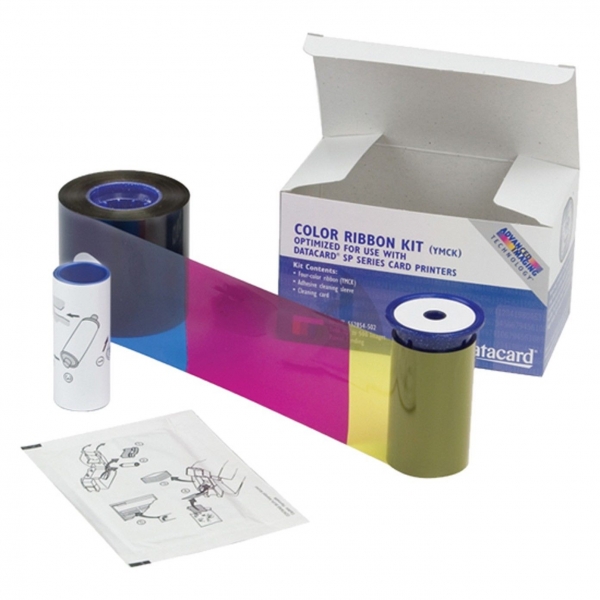
While this may seem self-evident, let’s break these two down before progressing. A monochrome printer ribbon is capable of doing black, white, and various shades of gray, while a color ribbon usually consists of four colors: yellow, magenta, cyan, and black,which has earned these ribbons the acronym YMCK. These four colors combine to produce pretty much every color of the rainbow, so there’s no shortage of customization options. If the ID cards you plan on producing are going to be basic, black and white affairs, then you will be looking for a model compatible with this type of printer ribbon. However, if you are looking to add a little vibrancy to your ID cards, or want to color code badges for various security clearances, then you will need to find a printer that works with this type of ribbon.
You will be printing on both sides of the card?
It might not sound like it, but the answer can influence the type of ribbon, and thus printer, you will need. For instance, if you want to put a photo on one side and a bar code on the other, finding a printer that can do this will help you narrow the field. Keep in mind that these ribbons will typically print color on the front, and black and white on the reverse side.
Will you need lamination ribbons?
Some printer ribbons will automatically laminate the cards for you, which can be a real time saver. Coincidentally, these types of ribbons are known as YMCKO (“O” being for Overlay).
How important is volume?
On a typical day are you printing 10 or 100 ID cards? Given certain specifications, a printer ribbon might yield around 200 cards, or up to 10x that number. Cheaper is not always less expensive, so find a printer that produces the volume you need.
Do you know your acronyms?
In addition to the YMCK, and YMCKO already covered, you will probably come across other variations of this such as, YMC and YMCKOKO to name only a couple. The YMC is color and capable of producing composite black, which is not good for barcodes. The YMCKOKO is capable of putting barcodes on both sides of the card while including two overlays.
Pay Attention to Brand
Whatever make you ultimately choose, keep in mind that there are going to be twice as many “will-fit” ribbons available for purchase as there are printer models on the market. Remember, you want the most cost effective option, which is typically a name brand printer ribbon.
For more information on printer ribbon types, or to order the type you need, contact us at Avon Security Products today!
Published: July 18, 2016
| Updated: September 23, 2024
Author: Team Avon
If you’re interning for the summer, it’s important to invest in photo ID badges. This much is common knowledge- what may not be is whyit’s important, as well as what kind of badge to have and what information needs to be present on that badge.
Why Interns Need Photo ID Badges
Organization
The base answer is simple enough, for security. You’re playing a new, temporary role in the business you’re going to be interning at. Even if you’re wearing a matching uniform with other employees, people will still notice you since you aren’t one of their recognized coworkers. When this happens, you need to be able to identify yourself, and photo ID badges with your name and important information on them is what let people know you’re an intern.
What Information You Need On Them
Obviously you need an up-to-date picture of your face, but you’ll also need information that distinguishes you from normal employees, so you’re easily identified as an intern.
This information includes:
·Your name. Include both your actual given name, and any shortened form of your name or common nickname. Some of your colleagues may not recognize you as Christopher, but will recognize you as Chris.
·Manager name. People need a trusted figure in the company to ask about you and, if necessary, be held responsible for you.
·Department. What department of the company are you supposed to be operating in? All photo ID badges should have information readily available.
·Last day of employment. How long will you be interning? Find out the exact date that you’ll be leaving and have it placed on your photo ID badge.
What Kind You Need
o:p> There are two main types of photo ID badges: self-expiring daily badges, or cards with expiration dates. While the former can have their uses, in the long term they’re a hassle to deal with and make your image inconsistent. Having a steady badge for most, if not all, of your internship not only makes a good impression on the people who see you regularly, but it’s also much easier to manage in the long run. That being said, you may be left with one last, burning question.
What Now?
Well, to learn more about ID cards and office technology, feel free to peruse our blog for more information. Employers should usually help provide identification- if you need our help, though, you’re more than welcome to contact us for assistance or browse our selection of products.
×
1
Product selection
2
Contact information
3
Review information
How many cards will you print a year?
Organizations needing to print less than 25 cards per year may find it more economical to use a card printing service.
Automatically print on both side of the Card?
Dual-sided printers usually cost significantly more than single-sided printers. In some cases a single-sided printer can be used to print both sides of an ID card:
If the back of every card is identical (i.e.: If lost, return to... This card is property of...), you can use a single-sided printer and pre-print a batch of card backs, often using an inexpensive black ribbon. Those cards can be sent through the printer a second time to include customized information on the other side. This method is not recommended for printing on technology cards due to possible damage it could cause to the card.
Even if the back and front is unique for every card, you can print one side of an ID card, flip it over and print the back. This is much more time consuming, and is not recommended for organizations that print a large volume of ID Cards. This method is also not recommended for printing on technology cards due to possible damage it could cause to the card.
Need to use the printer with an Apple MacTM?
Only a few models of ID card printers on the market are compatible with Mac computers.
There is currently not any commercial ID card software that is compatible with Mac computers. If at all possible, we recommend using a PC to manage an ID card system.

 1.866.458.6999
 You Have Quick and Easy Access
 Choose Between Paper and Muslin
 Purchase a Barcode Scanner
 Benefits of Personalized Lanyards
 Third Party ID Card Printing Service
 No Delays
 Are you going with monochrome or color?
 Organization